Модуль Auth
Огляд
Baza Booking Calendar Auth – це повнофункціональний модуль аутентифікації для WordPress, який забезпечує лаконічну та зручну систему облікових записів.
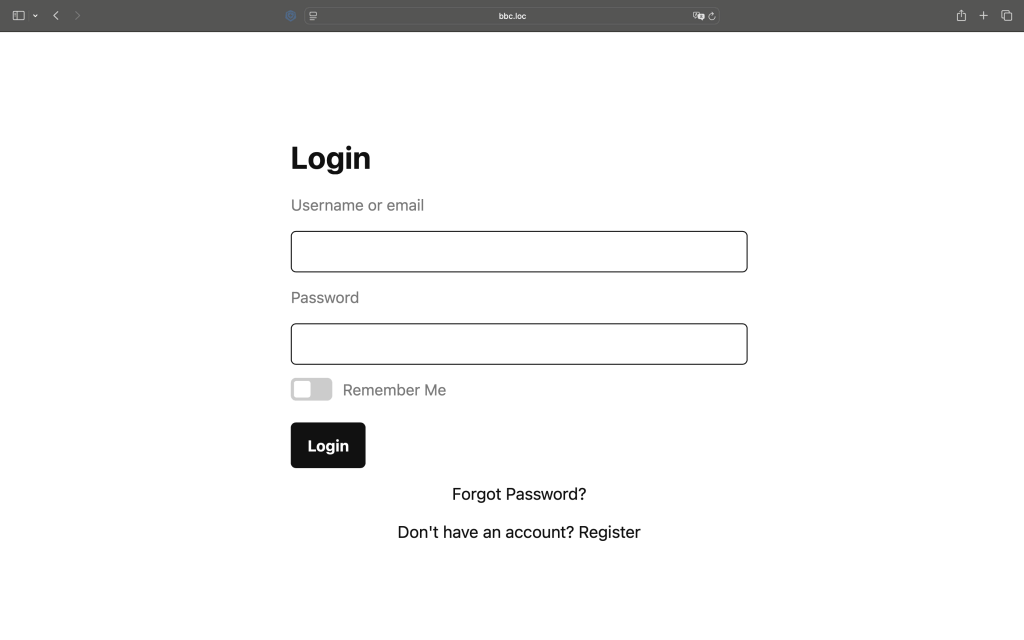
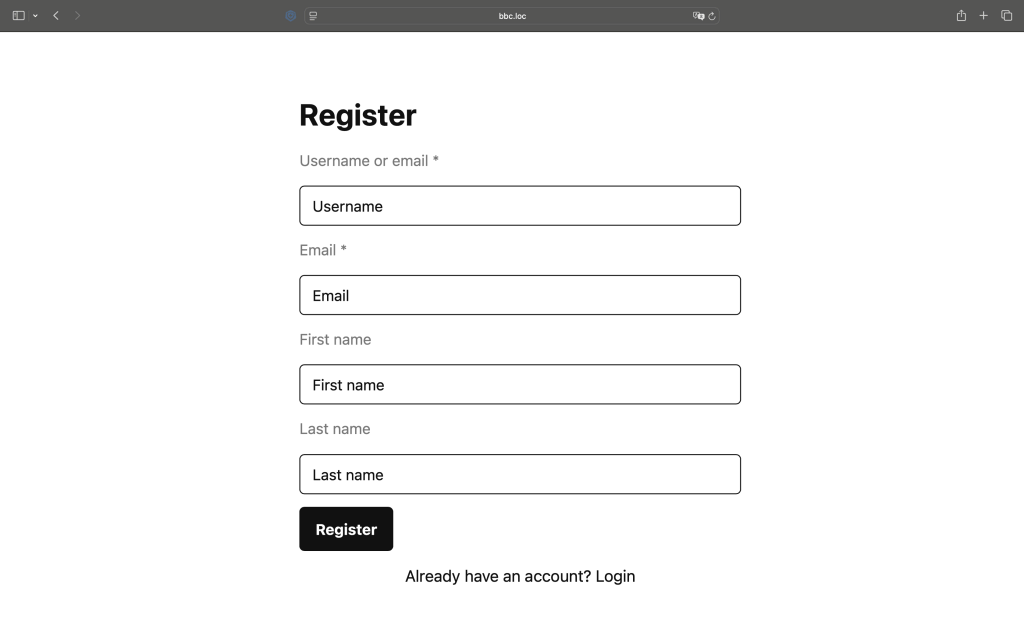
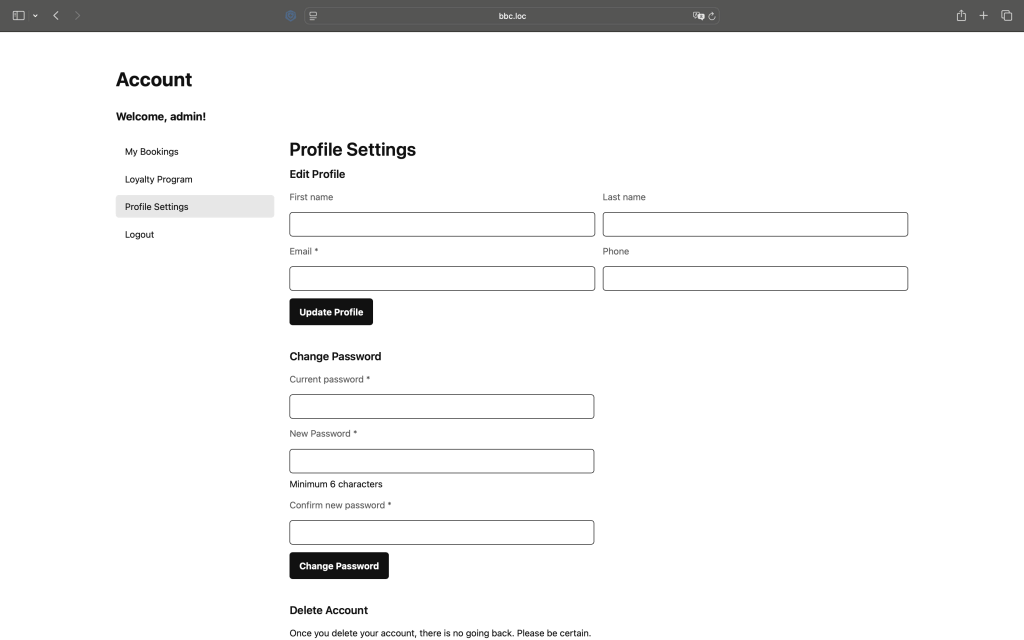
Він включає в себе вхід у систему, реєстрацію та особисту панель управління з окремими розділами для управління профілем, бронюваннями та функціями програми лояльності.
Цей модуль повністю відповідає стандартам WordPress і може бути налаштований за допомогою фільтрів та дій.
Структура URL-адреси
Після активації плагін «Baza Booking Calendar Auth» автоматично створює лаконічні та інтуїтивно зрозумілі URL-адреси:
- /account/ – головна сторінка облікового запису
- /account/login/ – форма входу
- /account/register/ – форма реєстрації
- /account/lostpassword/ – сторінка для відновлення пароля
- /account/resetpass/ – сторінка для скидання пароля
- /account/dashboard/ – особиста панель користувача
- /account/dashboard/bookings/ – мої бронювання
- /account/dashboard/loyalty/ – програма лояльності
- /account/dashboard/profile/ – налаштування профілю
Така структура забезпечує послідовність навігації для користувачів та сприяє оптимізації сайту для пошукових систем.
Основні функції
Baza Booking Calendar Auth надає всі необхідні функції для управління обліковим записом:
- Безпечна реєстрація користувачів із перевіркою даних та повідомленнями на електронну пошту
- Вхід та вихід із системи за допомогою вбудованої системи автентифікації WordPress
- Панель управління користувача з декількома вкладками та гнучкою навігацією
- Редагування профілю (ім’я, електронна пошта, телефон тощо)
- Зміна пароля з перевіркою в режимі реального часу
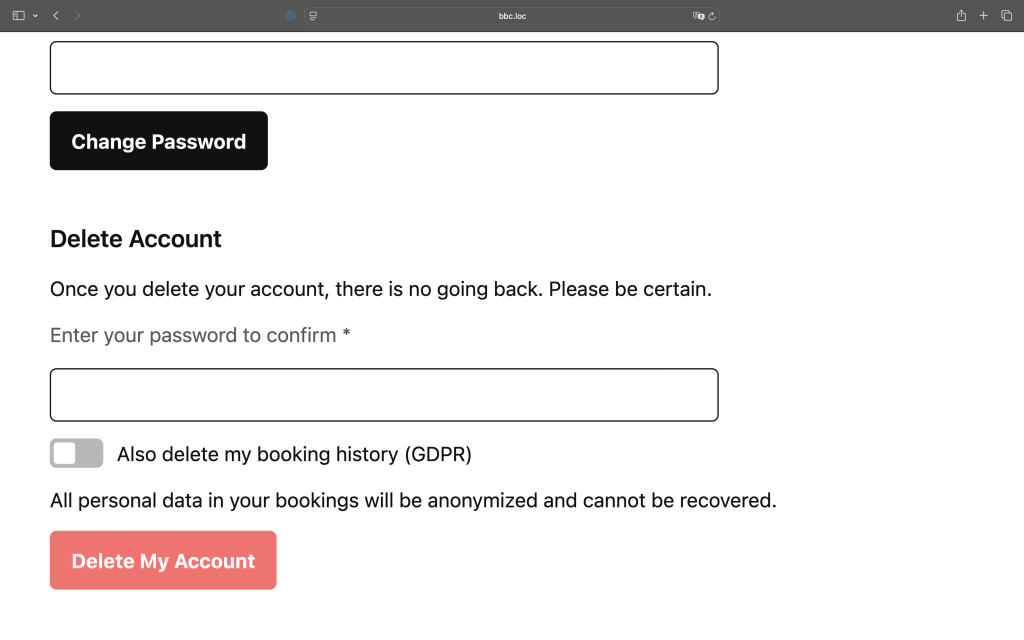
- Видалення облікового запису з підтвердженням пароля
- Переписування URL-адрес
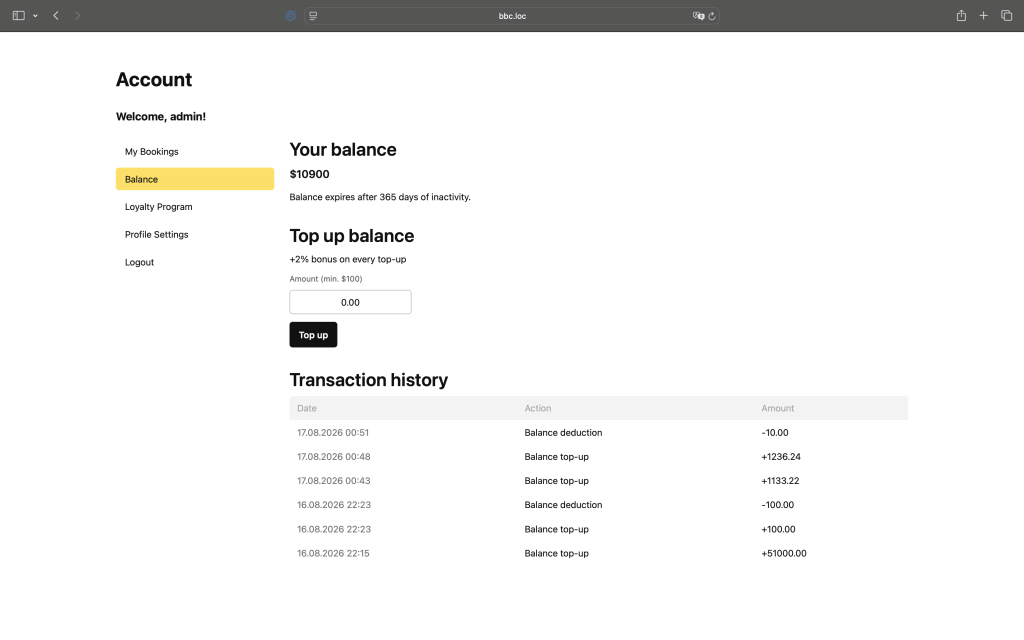
Баланс акаунту
Баланс акаунту вмикається в General Settings перемикачем Enable user balance, який активує поповнення, витрачання з балансу та накопичення бонусів для зареєстрованих користувачів.
Після ввімкнення адміністратор може налаштувати мінімальну суму поповнення, термін дії балансу (в днях), мінімальну суму оплати з балансу та відсоток бонусу при поповненні.
Користувачі поповнюють баланс через поточний активний платіжний шлюз прямо з вкладки Баланс. Після поповнення баланс можна використати для оплати бронювання замість повторного проходження через платіжний шлюз.
Кожне поповнення та списання фіксується в історії транзакцій із зазначенням дати, дії та суми.
Після ввімкнення вкладка Баланс стає доступною за адресою /account/dashboard/balance/ поряд з іншими вкладками акаунту (Бронювання, Програма лояльності, Налаштування профілю).
Шорткоди
Модуль підтримує шорткоди для зручного вбудовування. Ви також можете налаштовувати назви полів та підказки у формі за допомогою параметрів шорткоду, наприклад:
[baza_booking_calendar_auth] - displays login and registration forms

[baza_booking_calendar_auth show_welcome="false"] - Disable welcome

[baza_booking_calendar_balance] — outputs the formatted balance, e.g. $150.00

[baza_booking_calendar_balance format="raw"] — just the number 150.00

[baza_booking_calendar_dashboard] - displays the user dashboard

[baza_booking_calendar_dashboard default_tab="profile"] - opens a specific dashboard tab by default

[baza_booking_calendar_auth
    redirect="/account/dashboard/"
    show_welcome="true"
    welcome_text="Welcome Back!"
    dashboard_button_text="Go to Dashboard"
    login_title="Sign In"
    register_title="Create Account"
    forgot_password_text="Forgot Password?"
    no_account_text="Don't have an account? Register"
    have_account_text="Already have an account? Login"
    registration_success_text="Registration successful! You can now login."
    login_button_text="Sign In"
    register_button_text="Sign Up"
    username_label="Username or Email"
    password_label="Password"
    email_label="Email"
    confirm_password_label="Confirm Password"
    first_name_label="First Name"
    last_name_label="Last Name"
    remember_me_label="Remember Me"
    username_placeholder="Enter your username"
    email_placeholder="Enter your email address"
    password_placeholder="Enter your password"
    first_name_placeholder="Enter your first name"
    last_name_placeholder="Enter your last name"
]
Усі доступні фільтри (хуки)
Форма входу:
- bbc_before_login_form – Перед усією формою входу
- bbc_before_login_form_fields – Перед полями форми
- bbc_after_login_form_fields – Після полів форми
- bbc_after_login_form – Після заповнення всієї форми входу
Реєстраційна форма:
- bbc_before_register_form – Перед відображенням усієї форми реєстрації
- bbc_register_form_start – початок форми (після відкриваючого тегу)
- bbc_register_form_after_username – Після поля «Ім’я користувача»
- bbc_register_form_after_email – Після поля електронної пошти
- bbc_register_form_after_password – Після поля для введення пароля
- bbc_register_form_after_password_confirm – Після підтвердження пароля
- bbc_register_form_after_first_name – Після імені
- bbc_register_form_after_last_name – Після прізвища
- bbc_register_form_before_submit – Перед натисканням кнопки «Відправити»
- bbc_register_form_after_submit – Після натискання кнопки «Відправити»
- bbc_after_register_form – Після заповнення всієї реєстраційної форми
Форма для відновлення пароля:
- bbc_before_lostpassword_form – Перед відкриттям форми для відновлення забутого пароля
- bbc_before_lostpassword_form_fields – Перед полями форми
- bbc_lostpassword_form_before_submit – Перед натисканням кнопки «Відправити»
- bbc_lostpassword_form_after_submit – Після натискання кнопки «Відправити»
- bbc_after_lostpassword_form_fields – Після полів форми
- bbc_after_lostpassword_form – Після заповнення форми для відновлення пароля
Форма для відновлення пароля:
- bbc_before_resetpass_form – перед завантаженням усієї форми для скидання пароля
- bbc_before_resetpass_form_fields – Перед полями форми
- bbc_resetpass_form_before_submit – Перед натисканням кнопки «Відправити»
- bbc_resetpass_form_after_submit – Після натискання кнопки «Відправити»
- bbc_after_resetpass_form_fields – Після полів форми
- bbc_after_resetpass_form – Після заповнення всієї форми для скидання пароля
<?php

/**
 * FILTERS
 */

// Show/hide dashboard title (default: true)
add_filter( 'bbc_dashboard_show_title', '__return_false' );

// Show/hide title conditionally
add_filter( 'bbc_dashboard_show_title', function( $show, $user, $tab ) {
    if ( $tab === 'profile' ) {
        return false;
    }
    return $show;
}, 10, 3 );

// Change dashboard title text
add_filter( 'bbc_dashboard_title', function( $title, $user, $tab ) {
    return sprintf( __( 'Hello, %s!', 'textdomain' ), $user->display_name );
}, 10, 3 );

// Change title based on tab
add_filter( 'bbc_dashboard_title', function( $title, $user, $tab ) {
    $titles = array(
        'bookings' => __( 'My Bookings', 'textdomain' ),
        'loyalty'  => __( 'Loyalty Program', 'textdomain' ),
        'profile'  => __( 'Profile Settings', 'textdomain' )
    );

    return isset( $titles[$tab] ) ? $titles[$tab] : $title;
}, 10, 3 );

// Show/hide menu (default: true)
add_filter( 'bbc_dashboard_show_menu', '__return_false' );

// Show/hide menu conditionally
add_filter( 'bbc_dashboard_show_menu', function( $show, $user, $tab ) {
    if ( $tab === 'logout' ) {
        return false;
    }
    return $show;
}, 10, 3 );

// Modify dashboard tabs
add_filter( 'bbc_dashboard_tabs', function( $tabs, $current_tab ) {
    $tabs['custom'] = array(
        'title' => __( 'Custom Tab', 'textdomain' ),
        'url'   => home_url( '/account/dashboard/custom/' ),
        'order' => 15
    );

    unset( $tabs['loyalty'] );

    return $tabs;
}, 10, 2 );

// Render custom tab content
// Use together with bbc_dashboard_tabs to add full custom tab
add_filter( 'bbc_dashboard_render_tab', function( $content, $tab ) {
    if ( $tab !== 'custom' ) return $content;

    ob_start();
    ?>
    <div class="bbc-custom-tab">
        <h3><?php _e( 'Custom Tab', 'textdomain' ); ?></h3>
        <p>Your custom content here.</p>
    </div>
    <?php
    return ob_get_clean();
}, 10, 2 );

// Number of items per page (default: 10)
add_filter( 'bbc_account_bookings_per_page', function( $per_page ) {
    return 20;
});

// Bookings data before sorting
add_filter( 'bbc_account_bookings_before_sort', function( $bookings ) {
    return $bookings;
});

// Bookings data after sorting
add_filter( 'bbc_account_bookings_after_sort', function( $bookings, $orderby, $order ) {
    return $bookings;
}, 10, 3 );

// Show/hide table count
add_filter( 'bbc_account_bookings_show_table_count', '__return_false' );

// Show/hide pagination
add_filter( 'bbc_account_bookings_show_pagination', '__return_false' );

// Show/hide entire table
add_filter( 'bbc_account_bookings_show_table', '__return_false' );

// Show/hide empty bookings message
add_filter( 'bbc_account_bookings_show_empty_message', '__return_false' );

// Pagination arguments
add_filter( 'bbc_account_bookings_pagination_args', function( $args ) {
    return $args;
});

/**
 * ACTIONS
 */

// Before title
add_action( 'bbc_dashboard_before_title', function( $user, $tab ) {
    echo '<div class="welcome-banner">Welcome back!</div>';
}, 10, 2 );

// After title
add_action( 'bbc_dashboard_after_title', function( $user, $tab ) {
    echo '<p class="dashboard-subtitle">Manage your account</p>';
}, 10, 2 );

// Before menu
add_action( 'bbc_dashboard_before_menu', function( $user, $tab ) {
    echo '<div class="user-stats">Total bookings: 5</div>';
}, 10, 2 );

// Before each menu item
add_action( 'bbc_dashboard_before_menu_item', function( $tab_key, $tab_data, $current_tab ) {
    if ( $tab_key === 'bookings' ) {
        echo '<span class="menu-icon">📅</span>';
    }
}, 10, 3 );

// After each menu item
add_action( 'bbc_dashboard_after_menu_item', function( $tab_key, $tab_data, $current_tab ) {
    if ( $tab_key === 'bookings' ) {
        echo '<span class="menu-badge">3</span>';
    }
}, 10, 3 );

// After menu
add_action( 'bbc_dashboard_after_menu', function( $user, $tab ) {
    echo '<div class="quick-actions">Quick actions here</div>';
}, 10, 2 );

// Before content
add_action( 'bbc_dashboard_before_content', function( $user, $tab ) {
    echo '<div class="content-header">Current tab: ' . $tab . '</div>';
}, 10, 2 );

// After content
add_action( 'bbc_dashboard_after_content', function( $user, $tab ) {
    echo '<div class="content-footer">Need help? Contact support</div>';
}, 10, 2 );

// Before title
add_action( 'bbc_account_bookings_before_title', function() {
    echo '<div class="custom-alert">Special announcement</div>';
});

// After title
add_action( 'bbc_account_bookings_after_title', function() {
    echo '<p class="subtitle">Manage your bookings below</p>';
});

// Before controls (where sorting would go)
add_action( 'bbc_account_bookings_before_controls', function() {
    echo '<div class="custom-filters">Custom filters here</div>';
});

// Inside table nav on the right side
add_action( 'bbc_account_bookings_table_nav_right', function( $orderby, $order, $per_page ) {
    ?>
    <div class="bbc-table-sort">
        <label for="bbc-sort"><?php _e( 'Sort:', 'baza-booking-calendar' ); ?></label>
        <select id="bbc-sort" class="bbc-sort-select">
            <option value="date-desc" <?php selected( $orderby === 'date' && $order === 'desc' ); ?>>
                <?php _e( 'Newest First', 'baza-booking-calendar' ); ?>
            </option>
            <option value="date-asc" <?php selected( $orderby === 'date' && $order === 'asc' ); ?>>
                <?php _e( 'Oldest First', 'baza-booking-calendar' ); ?>
            </option>
            <option value="price-desc" <?php selected( $orderby === 'price' && $order === 'desc' ); ?>>
                <?php _e( 'Price: High to Low', 'baza-booking-calendar' ); ?>
            </option>
            <option value="price-asc" <?php selected( $orderby === 'price' && $order === 'asc' ); ?>>
                <?php _e( 'Price: Low to High', 'baza-booking-calendar' ); ?>
            </option>
        </select>
    </div>
    <?php
}, 10, 3 );

// After controls
add_action( 'bbc_account_bookings_after_controls', function( $orderby, $order, $per_page ) {
    echo '<div class="custom-notice">Current sort: ' . $orderby . '</div>';
}, 10, 3 );

// Before table
add_action( 'bbc_account_bookings_before_table', function( $bookings ) {
    echo '<div class="table-info">Showing ' . count( $bookings ) . ' bookings</div>';
});

// Before each row
add_action( 'bbc_account_bookings_before_row', function( $booking ) {
    // Add custom class or markup before row
});

// After each row
add_action( 'bbc_account_bookings_after_row', function( $booking ) {
    // Add expandable details row
    echo '<tr class="booking-details"><td colspan="5">Details for ' . $booking['order_id'] . '</td></tr>';
});

// After table
add_action( 'bbc_account_bookings_after_table', function( $bookings ) {
    echo '<div class="table-summary">Total bookings: ' . count( $bookings ) . '</div>';
});

// Before pagination
add_action( 'bbc_account_bookings_before_pagination', function( $paged, $total_pages ) {
    echo '<div class="pagination-info">Page ' . $paged . ' of ' . $total_pages . '</div>';
}, 10, 2 );

// After pagination
add_action( 'bbc_account_bookings_after_pagination', function( $paged, $total_pages ) {
    echo '<a href="#top" class="back-to-top">Back to top</a>';
}, 10, 2 );

// After all content
add_action( 'bbc_account_bookings_after_content', function() {
    echo '<div class="booking-help">Need help? Contact support</div>';
});

/**
 * FILTERS LOGIN AND REGISTER FORM
 */

/**
 * LOGIN FORM HOOKS
 */

// Add content before login form
add_action( 'bbc_before_login_form', function( $atts ) {
    echo '<div class="login-notice">Welcome back!</div>';
});

// Add content before form fields
add_action( 'bbc_before_login_form_fields', function( $atts ) {
    echo '<p class="login-info">Please enter your credentials</p>';
});

// Add content after form fields
add_action( 'bbc_after_login_form_fields', function( $atts ) {
    echo '<div class="social-login"><button>Login with Google</button></div>';
});

// Add content after login form
add_action( 'bbc_after_login_form', function( $atts ) {
    echo '<p class="help-text">Need help? <a href="/support">Contact support</a></p>';
});

/**
 * REGISTRATION FORM HOOKS
 */

// Add content before registration form
add_action( 'bbc_before_register_form', function( $atts ) {
    echo '<div class="register-benefits">Join us and get 10% off!</div>';
});

// Add content after form opens
add_action( 'bbc_register_form_start', function( $atts ) {
    echo '<p class="form-intro">Fill in all required fields</p>';
});

// Add phone field after email
add_action( 'bbc_register_form_after_email', function( $atts ) {
    ?>
    <div class="form-row">
        <label for="phone">Phone *</label>
        <input type="tel" name="phone" id="phone" class="regular-text" placeholder="+44" required />
    </div>
    <?php
});

// Add hint after username
add_action( 'bbc_register_form_after_username', function( $atts ) {
    echo '<small class="field-hint">Username cannot be changed later</small>';
});

// Add hint after password
add_action( 'bbc_register_form_after_password', function( $atts ) {
    echo '<small class="field-hint">Password must be at least 8 characters</small>';
});

// Add hint after password confirm
add_action( 'bbc_register_form_after_password_confirm', function( $atts ) {
    echo '<small class="field-hint">Passwords must match</small>';
});

// Add hint after first name
add_action( 'bbc_register_form_after_first_name', function( $atts ) {
    echo '<small class="field-hint">Optional but recommended</small>';
});

// Add custom field after last name
add_action( 'bbc_register_form_after_last_name', function( $atts ) {
    ?>
    <div class="form-row">
        <label for="company">Company</label>
        <input type="text" name="company" id="company" class="regular-text" placeholder="Your company name" />
    </div>
    <?php
});

// Add terms checkbox before submit button
add_action( 'bbc_register_form_before_submit', function( $atts ) {
    ?>
    <div class="form-row">
        <label>
            <input type="checkbox" name="terms" required />
            I agree to <a href="/terms">Terms and Conditions</a>
        </label>
    </div>
    <?php
});

// Add content after submit button
add_action( 'bbc_register_form_after_submit', function( $atts ) {
    echo '<p class="privacy-notice">Your data is protected by our privacy policy</p>';
});

// Add content after registration form
add_action( 'bbc_after_register_form', function( $atts ) {
    echo '<div class="social-register"><button>Register with Facebook</button></div>';
});

/**
 * REGISTRATION PROCESSING HOOKS
 */

// Save custom phone field
add_action( 'bbc_after_user_meta_update', function( $user_id, $first_name, $last_name ) {
    if ( isset( $_POST['phone'] ) ) {
        update_user_meta( $user_id, 'phone', sanitize_text_field( $_POST['phone'] ) );
    }
    if ( isset( $_POST['company'] ) ) {
        update_user_meta( $user_id, 'company', sanitize_text_field( $_POST['company'] ) );
    }
}, 10, 3 );

// Send welcome email after registration
add_action( 'bbc_registration_success', function( $user_id, $user_login, $user_email ) {
    // Send custom welcome email
    wp_mail( $user_email, 'Welcome!', 'Thank you for registering!' );
}, 10, 3 );

// Add user to mailing list
add_action( 'bbc_after_user_creation', function( $user_id, $user_login, $user_email ) {
    // Add to your mailing service
    // mailchimp_subscribe( $user_email );
}, 10, 3 );

/**
 * REGISTRATION FILTERS
 */

// Add custom validation
add_filter( 'bbc_registration_validation_errors', function( $errors, $post_data ) {
    // Validate first name
    if ( empty( $post_data['first_name'] ) ) {
        $errors[] = 'First name is required.';
    }

    // Validate phone
    if ( isset( $post_data['phone'] ) && strlen( $post_data['phone'] ) < 10 ) {
        $errors[] = 'Phone number must be at least 10 digits.';
    }

    // Validate terms
    if ( empty( $post_data['terms'] ) ) {
        $errors[] = 'You must agree to the terms and conditions.';
    }

    return $errors;
}, 10, 2 );

// Enable auto-login after registration
add_filter( 'bbc_registration_auto_login', '__return_true' );

// Conditional auto-login
add_filter( 'bbc_registration_auto_login', function( $auto_login, $user_id ) {
    $user = get_user_by( 'id', $user_id );
    // Auto-login only subscribers
    return in_array( 'subscriber', $user->roles );
}, 10, 2 );

// Change redirect after registration
add_filter( 'bbc_registration_redirect_url', function( $url, $user_id ) {
    return home_url( '/welcome/' );
}, 10, 2 );

// Change auto-login redirect
add_filter( 'bbc_registration_auto_login_redirect', function( $url, $user_id ) {
    return home_url( '/account/dashboard/profile/' );
}, 10, 2 );
Приклади вживання
<?php

// Example: Hide title completely
add_filter( 'bbc_dashboard_show_title', '__return_false' );

// Example: Hide title on specific tab
add_filter( 'bbc_dashboard_show_title', function( $show, $user, $tab ) {
    return $tab !== 'profile';
}, 10, 3 );

// Example: Custom title with avatar
add_filter( 'bbc_dashboard_title', function( $title, $user, $tab ) {
    return get_avatar( $user->ID, 32 ) . ' ' . sprintf( __( 'Hi, %s!', 'textdomain' ), $user->first_name );
}, 10, 3 );

// Example: Different title per tab
add_filter( 'bbc_dashboard_title', function( $title, $user, $tab ) {
    $tab_titles = array(
        'bookings' => __( 'Your Bookings', 'textdomain' ),
        'loyalty'  => __( 'Your Rewards', 'textdomain' ),
        'profile'  => __( 'Account Settings', 'textdomain' )
    );

    return isset( $tab_titles[$tab] ) ? $tab_titles[$tab] : $title;
}, 10, 3 );

// Example: Hide title, show custom header
add_filter( 'bbc_dashboard_show_title', '__return_false' );
add_action( 'bbc_dashboard_before_title', function( $user, $tab ) {
    ?>
    <div class="custom-dashboard-header">
        <div class="user-info">
            <?php echo get_avatar( $user->ID, 64 ); ?>
            <div class="user-details">
                <h2><?php echo esc_html( $user->display_name ); ?></h2>
                <p><?php echo esc_html( $user->user_email ); ?></p>
            </div>
        </div>
    </div>
    <?php
}, 10, 2 );

// Example: Hide menu on mobile
add_filter( 'bbc_dashboard_show_menu', function( $show, $user, $tab ) {
    if ( wp_is_mobile() ) {
        return false;
    }
    return $show;
}, 10, 3 );

// Example: Show title only for admins
add_filter( 'bbc_dashboard_show_title', function( $show, $user, $tab ) {
    return current_user_can( 'administrator' );
}, 10, 3 );

// Example: Replace title with breadcrumbs
add_filter( 'bbc_dashboard_show_title', '__return_false' );
add_action( 'bbc_dashboard_after_title', function( $user, $tab ) {
    ?>
    <nav class="bbc-breadcrumbs">
        <a href="<?php echo home_url(); ?>">Home</a> /
        <a href="<?php echo home_url( '/account/dashboard/' ); ?>">Dashboard</a> /
        <span><?php echo ucfirst( $tab ); ?></span>
    </nav>
    <?php
}, 10, 2 );

// Example: Time-based greeting
add_filter( 'bbc_dashboard_title', function( $title, $user, $tab ) {
    $hour = (int) current_time( 'H' );

    if ( $hour < 12 ) {
        $greeting = __( 'Good morning', 'textdomain' );
    } elseif ( $hour < 18 ) {
        $greeting = __( 'Good afternoon', 'textdomain' );
    } else {
        $greeting = __( 'Good evening', 'textdomain' );
    }

    return sprintf( '%s, %s!', $greeting, $user->display_name );
}, 10, 3 );

// Hide everything except table
add_filter( 'bbc_account_bookings_show_table_count', '__return_false' );
add_filter( 'bbc_account_bookings_show_pagination', '__return_false' );

// Show only 5 items without pagination
add_filter( 'bbc_account_bookings_per_page', function() { return 5; });
add_filter( 'bbc_account_bookings_show_pagination', '__return_false' );

// Filter bookings by status
add_filter( 'bbc_account_bookings_before_sort', function( $bookings ) {
    return array_filter( $bookings, function( $booking ) {
        return in_array( $booking['order_status'], array( 'booked', 'completed' ) );
    });
});

// Change pagination style
add_filter( 'bbc_account_bookings_pagination_args', function( $args ) {
    $args['prev_text'] = '‹';
    $args['next_text'] = '›';
    $args['end_size'] = 1;
    $args['mid_size'] = 1;
    return $args;
});

// Completely hide bookings section
add_filter( 'bbc_account_bookings_show_table', '__return_false' );
add_filter( 'bbc_account_bookings_show_table_count', '__return_false' );
add_filter( 'bbc_account_bookings_show_pagination', '__return_false' );

add_action( 'bbc_account_bookings_table_nav_right', function( $orderby, $order, $per_page ) {
    ?>
    <div class="bbc-custom-sort">
        <select class="bbc-sort-dropdown" onchange="window.location.href=this.value;">
            <option value="<?php echo esc_url( add_query_arg( array( 'orderby' => 'date', 'order' => 'desc' ) ) ); ?>"
                <?php selected( $orderby === 'date' && $order === 'desc' ); ?>>
                Newest First
            </option>
            <option value="<?php echo esc_url( add_query_arg( array( 'orderby' => 'date', 'order' => 'asc' ) ) ); ?>"
                <?php selected( $orderby === 'date' && $order === 'asc' ); ?>>
                Oldest First
            </option>
            <option value="<?php echo esc_url( add_query_arg( array( 'orderby' => 'price', 'order' => 'desc' ) ) ); ?>"
                <?php selected( $orderby === 'price' && $order === 'desc' ); ?>>
                Highest Price
            </option>
            <option value="<?php echo esc_url( add_query_arg( array( 'orderby' => 'price', 'order' => 'asc' ) ) ); ?>"
                <?php selected( $orderby === 'price' && $order === 'asc' ); ?>>
                Lowest Price
            </option>
        </select>
    </div>
    <?php
}, 10, 3 );