Auth Module
Overview
Baza Booking Calendar Auth is a full-featured authentication module for WordPress that provides a clean, user-friendly account system.
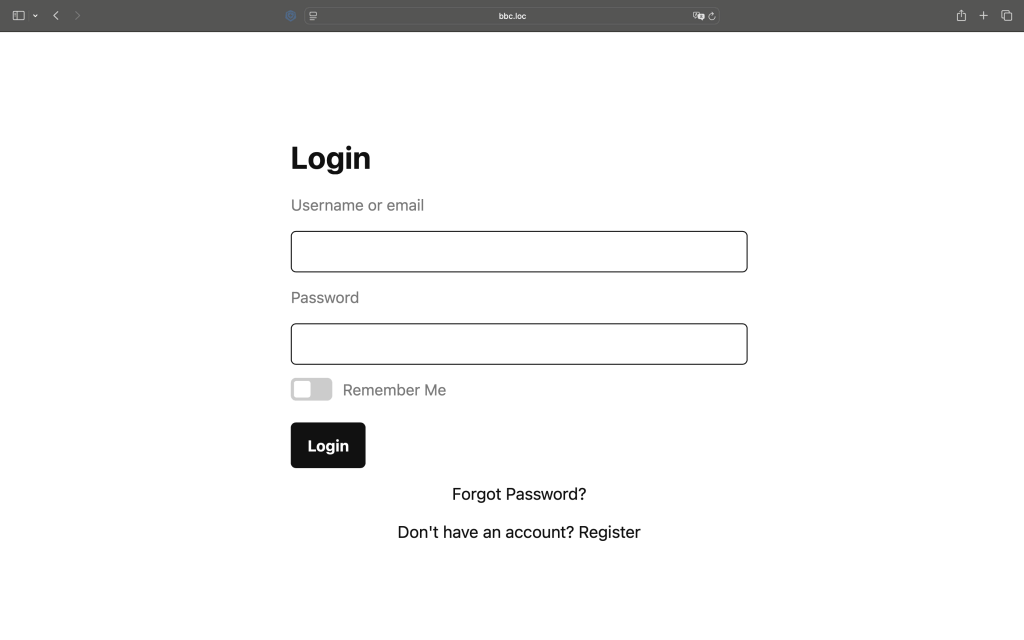
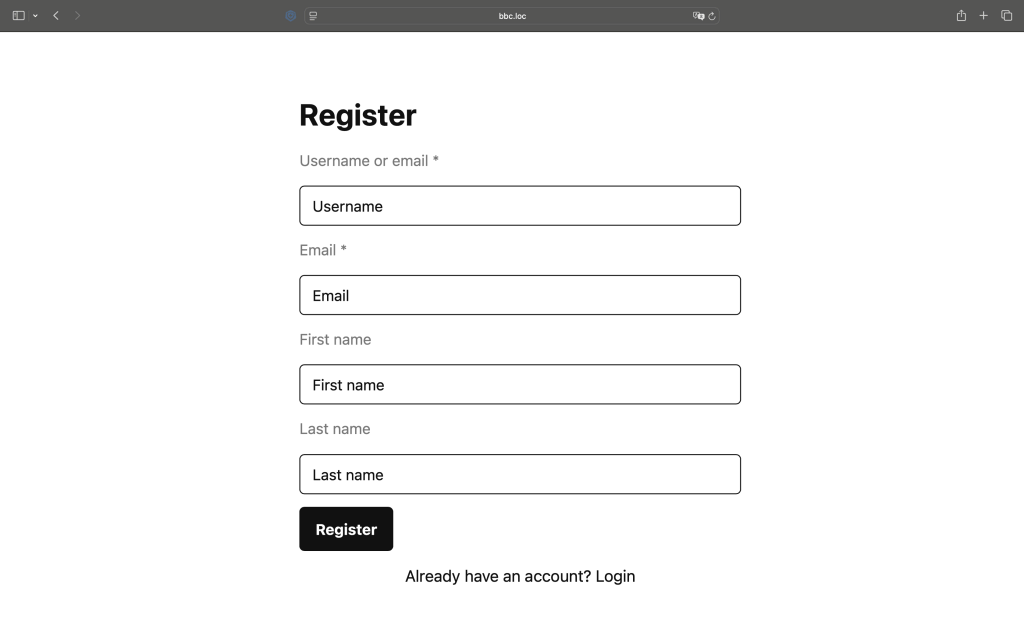
It includes login, registration, and a personal dashboard with separate sections for profile management, bookings, and loyalty features.
The module is fully compatible with WordPress standards and can be customized through filters and actions.
URL Structure
When activated, Baza Booking Calendar Auth automatically creates clean and intuitive URLs:
- /account/ – main account page
- /account/login/ – login form
- /account/register/ – registration form
- /account/lostpassword/ – lost password page
- /account/resetpass/ – reset password page
- /account/dashboard/ – user dashboard
- /account/dashboard/bookings/ – my bookings
- /account/dashboard/loyalty/ – loyalty program
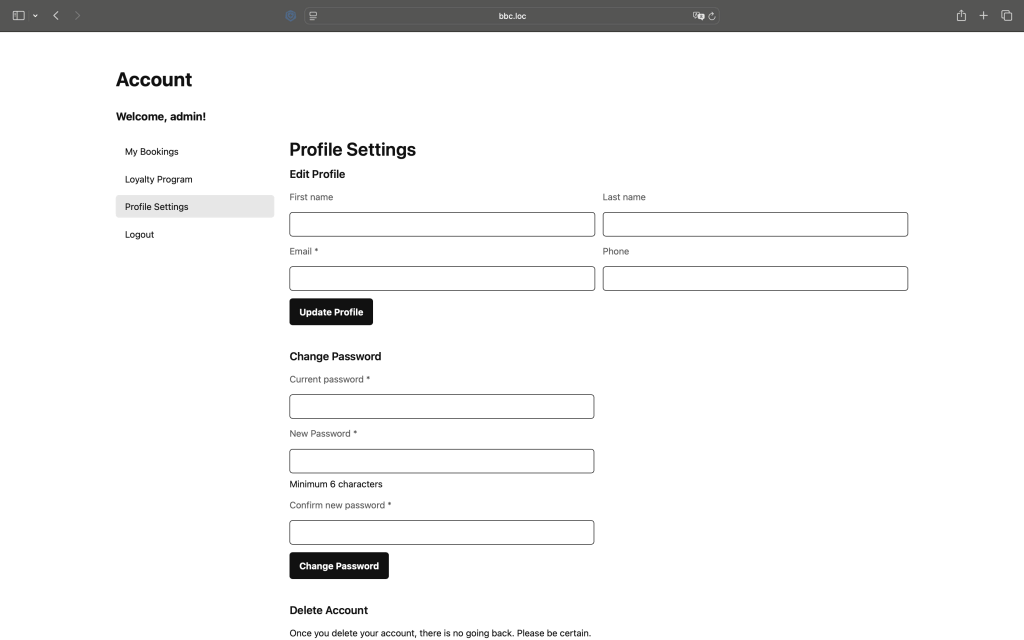
- /account/dashboard/profile/ – profile settings
- /account/dashboard/balance/ – account balance
This structure keeps user navigation consistent and SEO-friendly.
Core Functionality
Baza Booking Calendar Auth provides all essential features for account management:
- Secure user registration with validation and email notifications
- Login and logout using native WordPress authentication
- Multi-tab user dashboard with flexible navigation
- Profile editing (name, email, phone, etc.)
- Password change with real-time validation
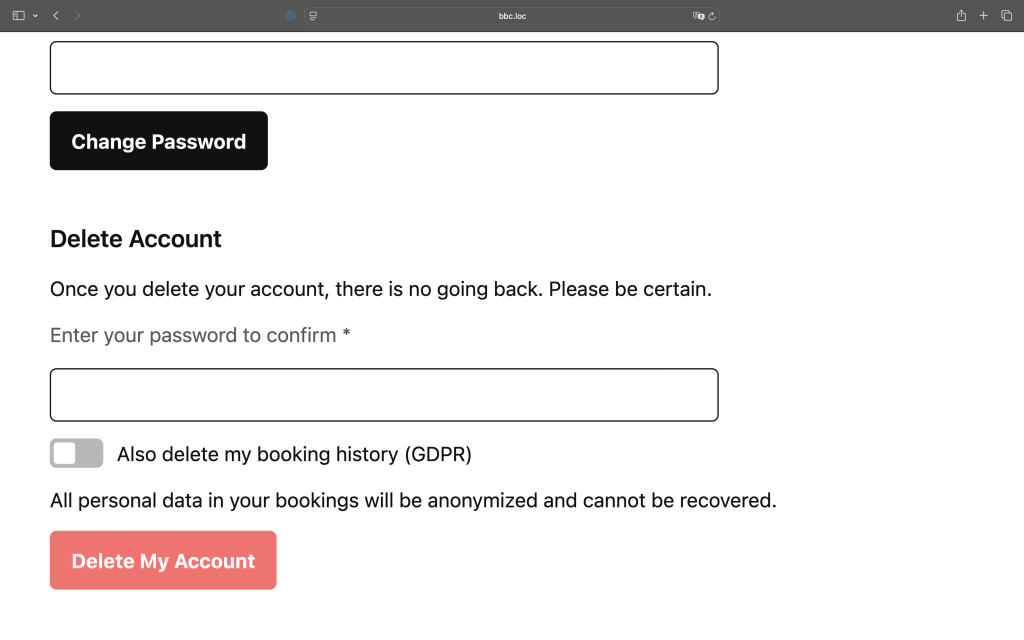
- Account deletion with password confirmation
- URL rewriting
- Account balance with top-up via the active payment gateway and balance-based checkout
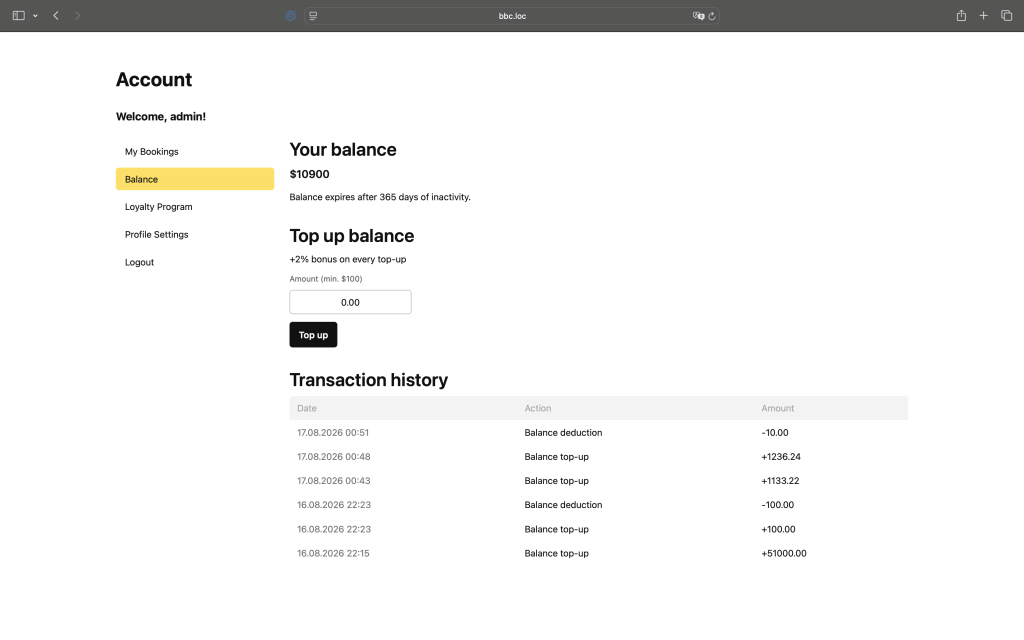
Account Balance
Account balance is controlled from General Settings via the Enable user balance toggle, which activates top-up, spending from balance, and bonus accumulation for registered users.
Once enabled, admins can configure the minimum top-up amount, balance expiry (in days), minimum payment from balance, and top-up bonus percentage.
Users top up their balance through the currently active payment gateway, directly from the Balance tab. Once funded, the balance can be used to pay for a booking instead of going through the payment gateway again.
Every top-up and deduction is recorded in a transaction history with date, action, and amount.
When enabled, the Balance tab becomes available at /account/dashboard/balance/ alongside the other dashboard tabs (Bookings, Loyalty Program, Profile Settings).
Shortcodes
The module supports shortcodes for easy embedding. You can also customize form labels and placeholders using shortcode parameters, for example:
[baza_booking_calendar_auth] - displays login and registration forms

[baza_booking_calendar_auth show_welcome="false"] - Disable welcome

[baza_booking_calendar_balance] — outputs the formatted balance, e.g. $150.00

[baza_booking_calendar_balance format="raw"] — just the number 150.00

[baza_booking_calendar_dashboard] - displays the user dashboard

[baza_booking_calendar_dashboard default_tab="profile"] - opens a specific dashboard tab by default

[baza_booking_calendar_auth
    redirect="/account/dashboard/"
    show_welcome="true"
    welcome_text="Welcome Back!"
    dashboard_button_text="Go to Dashboard"
    login_title="Sign In"
    register_title="Create Account"
    forgot_password_text="Forgot Password?"
    no_account_text="Don't have an account? Register"
    have_account_text="Already have an account? Login"
    registration_success_text="Registration successful! You can now login."
    login_button_text="Sign In"
    register_button_text="Sign Up"
    username_label="Username or Email"
    password_label="Password"
    email_label="Email"
    confirm_password_label="Confirm Password"
    first_name_label="First Name"
    last_name_label="Last Name"
    remember_me_label="Remember Me"
    username_placeholder="Enter your username"
    email_placeholder="Enter your email address"
    password_placeholder="Enter your password"
    first_name_placeholder="Enter your first name"
    last_name_placeholder="Enter your last name"
]
All available filters (hooks)
Login Form:
- bbc_before_login_form – Before entire login form
- bbc_before_login_form_fields – Before form fields
- bbc_after_login_form_fields – After form fields
- bbc_after_login_form – After entire login form
Registration Form:
- bbc_before_register_form – Before entire registration form
- bbc_register_form_start – Start of form (after opening tag)
- bbc_register_form_after_username – After username field
- bbc_register_form_after_email – After email field
- bbc_register_form_after_password – After password field
- bbc_register_form_after_password_confirm – After confirm password
- bbc_register_form_after_first_name – After first name
- bbc_register_form_after_last_name – After last name
- bbc_register_form_before_submit – Before submit button
- bbc_register_form_after_submit – After submit button
- bbc_after_register_form – After entire registration form
Lost Password Form:
- bbc_before_lostpassword_form – Before entire lost password form
- bbc_before_lostpassword_form_fields – Before form fields
- bbc_lostpassword_form_before_submit – Before submit button
- bbc_lostpassword_form_after_submit – After submit button
- bbc_after_lostpassword_form_fields – After form fields
- bbc_after_lostpassword_form – After entire lost password form
Reset Password Form:
- bbc_before_resetpass_form – Before entire reset password form
- bbc_before_resetpass_form_fields – Before form fields
- bbc_resetpass_form_before_submit – Before submit button
- bbc_resetpass_form_after_submit – After submit button
- bbc_after_resetpass_form_fields – After form fields
- bbc_after_resetpass_form – After entire reset password form
<?php

/**
 * FILTERS
 */

// Show/hide dashboard title (default: true)
add_filter( 'bbc_dashboard_show_title', '__return_false' );

// Show/hide title conditionally
add_filter( 'bbc_dashboard_show_title', function( $show, $user, $tab ) {
    if ( $tab === 'profile' ) {
        return false;
    }
    return $show;
}, 10, 3 );

// Change dashboard title text
add_filter( 'bbc_dashboard_title', function( $title, $user, $tab ) {
    return sprintf( __( 'Hello, %s!', 'textdomain' ), $user->display_name );
}, 10, 3 );

// Change title based on tab
add_filter( 'bbc_dashboard_title', function( $title, $user, $tab ) {
    $titles = array(
        'bookings' => __( 'My Bookings', 'textdomain' ),
        'loyalty'  => __( 'Loyalty Program', 'textdomain' ),
        'profile'  => __( 'Profile Settings', 'textdomain' )
    );

    return isset( $titles[$tab] ) ? $titles[$tab] : $title;
}, 10, 3 );

// Show/hide menu (default: true)
add_filter( 'bbc_dashboard_show_menu', '__return_false' );

// Show/hide menu conditionally
add_filter( 'bbc_dashboard_show_menu', function( $show, $user, $tab ) {
    if ( $tab === 'logout' ) {
        return false;
    }
    return $show;
}, 10, 3 );

// Modify dashboard tabs
add_filter( 'bbc_dashboard_tabs', function( $tabs, $current_tab ) {
    $tabs['custom'] = array(
        'title' => __( 'Custom Tab', 'textdomain' ),
        'url'   => home_url( '/account/dashboard/custom/' ),
        'order' => 15
    );

    unset( $tabs['loyalty'] );

    return $tabs;
}, 10, 2 );

// Render custom tab content
// Use together with bbc_dashboard_tabs to add full custom tab
add_filter( 'bbc_dashboard_render_tab', function( $content, $tab ) {
    if ( $tab !== 'custom' ) return $content;

    ob_start();
    ?>
    <div class="bbc-custom-tab">
        <h3><?php _e( 'Custom Tab', 'textdomain' ); ?></h3>
        <p>Your custom content here.</p>
    </div>
    <?php
    return ob_get_clean();
}, 10, 2 );

// Number of items per page (default: 10)
add_filter( 'bbc_account_bookings_per_page', function( $per_page ) {
    return 20;
});

// Bookings data before sorting
add_filter( 'bbc_account_bookings_before_sort', function( $bookings ) {
    return $bookings;
});

// Bookings data after sorting
add_filter( 'bbc_account_bookings_after_sort', function( $bookings, $orderby, $order ) {
    return $bookings;
}, 10, 3 );

// Show/hide table count
add_filter( 'bbc_account_bookings_show_table_count', '__return_false' );

// Show/hide pagination
add_filter( 'bbc_account_bookings_show_pagination', '__return_false' );

// Show/hide entire table
add_filter( 'bbc_account_bookings_show_table', '__return_false' );

// Show/hide empty bookings message
add_filter( 'bbc_account_bookings_show_empty_message', '__return_false' );

// Pagination arguments
add_filter( 'bbc_account_bookings_pagination_args', function( $args ) {
    return $args;
});

/**
 * ACTIONS
 */

// Before title
add_action( 'bbc_dashboard_before_title', function( $user, $tab ) {
    echo '<div class="welcome-banner">Welcome back!</div>';
}, 10, 2 );

// After title
add_action( 'bbc_dashboard_after_title', function( $user, $tab ) {
    echo '<p class="dashboard-subtitle">Manage your account</p>';
}, 10, 2 );

// Before menu
add_action( 'bbc_dashboard_before_menu', function( $user, $tab ) {
    echo '<div class="user-stats">Total bookings: 5</div>';
}, 10, 2 );

// Before each menu item
add_action( 'bbc_dashboard_before_menu_item', function( $tab_key, $tab_data, $current_tab ) {
    if ( $tab_key === 'bookings' ) {
        echo '<span class="menu-icon">📅</span>';
    }
}, 10, 3 );

// After each menu item
add_action( 'bbc_dashboard_after_menu_item', function( $tab_key, $tab_data, $current_tab ) {
    if ( $tab_key === 'bookings' ) {
        echo '<span class="menu-badge">3</span>';
    }
}, 10, 3 );

// After menu
add_action( 'bbc_dashboard_after_menu', function( $user, $tab ) {
    echo '<div class="quick-actions">Quick actions here</div>';
}, 10, 2 );

// Before content
add_action( 'bbc_dashboard_before_content', function( $user, $tab ) {
    echo '<div class="content-header">Current tab: ' . $tab . '</div>';
}, 10, 2 );

// After content
add_action( 'bbc_dashboard_after_content', function( $user, $tab ) {
    echo '<div class="content-footer">Need help? Contact support</div>';
}, 10, 2 );

// Before title
add_action( 'bbc_account_bookings_before_title', function() {
    echo '<div class="custom-alert">Special announcement</div>';
});

// After title
add_action( 'bbc_account_bookings_after_title', function() {
    echo '<p class="subtitle">Manage your bookings below</p>';
});

// Before controls (where sorting would go)
add_action( 'bbc_account_bookings_before_controls', function() {
    echo '<div class="custom-filters">Custom filters here</div>';
});

// Inside table nav on the right side
add_action( 'bbc_account_bookings_table_nav_right', function( $orderby, $order, $per_page ) {
    ?>
    <div class="bbc-table-sort">
        <label for="bbc-sort"><?php _e( 'Sort:', 'baza-booking-calendar' ); ?></label>
        <select id="bbc-sort" class="bbc-sort-select">
            <option value="date-desc" <?php selected( $orderby === 'date' && $order === 'desc' ); ?>>
                <?php _e( 'Newest First', 'baza-booking-calendar' ); ?>
            </option>
            <option value="date-asc" <?php selected( $orderby === 'date' && $order === 'asc' ); ?>>
                <?php _e( 'Oldest First', 'baza-booking-calendar' ); ?>
            </option>
            <option value="price-desc" <?php selected( $orderby === 'price' && $order === 'desc' ); ?>>
                <?php _e( 'Price: High to Low', 'baza-booking-calendar' ); ?>
            </option>
            <option value="price-asc" <?php selected( $orderby === 'price' && $order === 'asc' ); ?>>
                <?php _e( 'Price: Low to High', 'baza-booking-calendar' ); ?>
            </option>
        </select>
    </div>
    <?php
}, 10, 3 );

// After controls
add_action( 'bbc_account_bookings_after_controls', function( $orderby, $order, $per_page ) {
    echo '<div class="custom-notice">Current sort: ' . $orderby . '</div>';
}, 10, 3 );

// Before table
add_action( 'bbc_account_bookings_before_table', function( $bookings ) {
    echo '<div class="table-info">Showing ' . count( $bookings ) . ' bookings</div>';
});

// Before each row
add_action( 'bbc_account_bookings_before_row', function( $booking ) {
    // Add custom class or markup before row
});

// After each row
add_action( 'bbc_account_bookings_after_row', function( $booking ) {
    // Add expandable details row
    echo '<tr class="booking-details"><td colspan="5">Details for ' . $booking['order_id'] . '</td></tr>';
});

// After table
add_action( 'bbc_account_bookings_after_table', function( $bookings ) {
    echo '<div class="table-summary">Total bookings: ' . count( $bookings ) . '</div>';
});

// Before pagination
add_action( 'bbc_account_bookings_before_pagination', function( $paged, $total_pages ) {
    echo '<div class="pagination-info">Page ' . $paged . ' of ' . $total_pages . '</div>';
}, 10, 2 );

// After pagination
add_action( 'bbc_account_bookings_after_pagination', function( $paged, $total_pages ) {
    echo '<a href="#top" class="back-to-top">Back to top</a>';
}, 10, 2 );

// After all content
add_action( 'bbc_account_bookings_after_content', function() {
    echo '<div class="booking-help">Need help? Contact support</div>';
});

/**
 * FILTERS LOGIN AND REGISTER FORM
 */

/**
 * LOGIN FORM HOOKS
 */

// Add content before login form
add_action( 'bbc_before_login_form', function( $atts ) {
    echo '<div class="login-notice">Welcome back!</div>';
});

// Add content before form fields
add_action( 'bbc_before_login_form_fields', function( $atts ) {
    echo '<p class="login-info">Please enter your credentials</p>';
});

// Add content after form fields
add_action( 'bbc_after_login_form_fields', function( $atts ) {
    echo '<div class="social-login"><button>Login with Google</button></div>';
});

// Add content after login form
add_action( 'bbc_after_login_form', function( $atts ) {
    echo '<p class="help-text">Need help? <a href="/support">Contact support</a></p>';
});

/**
 * REGISTRATION FORM HOOKS
 */

// Add content before registration form
add_action( 'bbc_before_register_form', function( $atts ) {
    echo '<div class="register-benefits">Join us and get 10% off!</div>';
});

// Add content after form opens
add_action( 'bbc_register_form_start', function( $atts ) {
    echo '<p class="form-intro">Fill in all required fields</p>';
});

// Add phone field after email
add_action( 'bbc_register_form_after_email', function( $atts ) {
    ?>
    <div class="form-row">
        <label for="phone">Phone *</label>
        <input type="tel" name="phone" id="phone" class="regular-text" placeholder="+44" required />
    </div>
    <?php
});

// Add hint after username
add_action( 'bbc_register_form_after_username', function( $atts ) {
    echo '<small class="field-hint">Username cannot be changed later</small>';
});

// Add hint after password
add_action( 'bbc_register_form_after_password', function( $atts ) {
    echo '<small class="field-hint">Password must be at least 8 characters</small>';
});

// Add hint after password confirm
add_action( 'bbc_register_form_after_password_confirm', function( $atts ) {
    echo '<small class="field-hint">Passwords must match</small>';
});

// Add hint after first name
add_action( 'bbc_register_form_after_first_name', function( $atts ) {
    echo '<small class="field-hint">Optional but recommended</small>';
});

// Add custom field after last name
add_action( 'bbc_register_form_after_last_name', function( $atts ) {
    ?>
    <div class="form-row">
        <label for="company">Company</label>
        <input type="text" name="company" id="company" class="regular-text" placeholder="Your company name" />
    </div>
    <?php
});

// Add terms checkbox before submit button
add_action( 'bbc_register_form_before_submit', function( $atts ) {
    ?>
    <div class="form-row">
        <label>
            <input type="checkbox" name="terms" required />
            I agree to <a href="/terms">Terms and Conditions</a>
        </label>
    </div>
    <?php
});

// Add content after submit button
add_action( 'bbc_register_form_after_submit', function( $atts ) {
    echo '<p class="privacy-notice">Your data is protected by our privacy policy</p>';
});

// Add content after registration form
add_action( 'bbc_after_register_form', function( $atts ) {
    echo '<div class="social-register"><button>Register with Facebook</button></div>';
});

/**
 * REGISTRATION PROCESSING HOOKS
 */

// Save custom phone field
add_action( 'bbc_after_user_meta_update', function( $user_id, $first_name, $last_name ) {
    if ( isset( $_POST['phone'] ) ) {
        update_user_meta( $user_id, 'phone', sanitize_text_field( $_POST['phone'] ) );
    }
    if ( isset( $_POST['company'] ) ) {
        update_user_meta( $user_id, 'company', sanitize_text_field( $_POST['company'] ) );
    }
}, 10, 3 );

// Send welcome email after registration
add_action( 'bbc_registration_success', function( $user_id, $user_login, $user_email ) {
    // Send custom welcome email
    wp_mail( $user_email, 'Welcome!', 'Thank you for registering!' );
}, 10, 3 );

// Add user to mailing list
add_action( 'bbc_after_user_creation', function( $user_id, $user_login, $user_email ) {
    // Add to your mailing service
    // mailchimp_subscribe( $user_email );
}, 10, 3 );

/**
 * REGISTRATION FILTERS
 */

// Add custom validation
add_filter( 'bbc_registration_validation_errors', function( $errors, $post_data ) {
    // Validate first name
    if ( empty( $post_data['first_name'] ) ) {
        $errors[] = 'First name is required.';
    }

    // Validate phone
    if ( isset( $post_data['phone'] ) && strlen( $post_data['phone'] ) < 10 ) {
        $errors[] = 'Phone number must be at least 10 digits.';
    }

    // Validate terms
    if ( empty( $post_data['terms'] ) ) {
        $errors[] = 'You must agree to the terms and conditions.';
    }

    return $errors;
}, 10, 2 );

// Enable auto-login after registration
add_filter( 'bbc_registration_auto_login', '__return_true' );

// Conditional auto-login
add_filter( 'bbc_registration_auto_login', function( $auto_login, $user_id ) {
    $user = get_user_by( 'id', $user_id );
    // Auto-login only subscribers
    return in_array( 'subscriber', $user->roles );
}, 10, 2 );

// Change redirect after registration
add_filter( 'bbc_registration_redirect_url', function( $url, $user_id ) {
    return home_url( '/welcome/' );
}, 10, 2 );

// Change auto-login redirect
add_filter( 'bbc_registration_auto_login_redirect', function( $url, $user_id ) {
    return home_url( '/account/dashboard/profile/' );
}, 10, 2 );
Usage examples
<?php

// Example: Hide title completely
add_filter( 'bbc_dashboard_show_title', '__return_false' );

// Example: Hide title on specific tab
add_filter( 'bbc_dashboard_show_title', function( $show, $user, $tab ) {
    return $tab !== 'profile';
}, 10, 3 );

// Example: Custom title with avatar
add_filter( 'bbc_dashboard_title', function( $title, $user, $tab ) {
    return get_avatar( $user->ID, 32 ) . ' ' . sprintf( __( 'Hi, %s!', 'textdomain' ), $user->first_name );
}, 10, 3 );

// Example: Different title per tab
add_filter( 'bbc_dashboard_title', function( $title, $user, $tab ) {
    $tab_titles = array(
        'bookings' => __( 'Your Bookings', 'textdomain' ),
        'loyalty'  => __( 'Your Rewards', 'textdomain' ),
        'profile'  => __( 'Account Settings', 'textdomain' )
    );

    return isset( $tab_titles[$tab] ) ? $tab_titles[$tab] : $title;
}, 10, 3 );

// Example: Hide title, show custom header
add_filter( 'bbc_dashboard_show_title', '__return_false' );
add_action( 'bbc_dashboard_before_title', function( $user, $tab ) {
    ?>
    <div class="custom-dashboard-header">
        <div class="user-info">
            <?php echo get_avatar( $user->ID, 64 ); ?>
            <div class="user-details">
                <h2><?php echo esc_html( $user->display_name ); ?></h2>
                <p><?php echo esc_html( $user->user_email ); ?></p>
            </div>
        </div>
    </div>
    <?php
}, 10, 2 );

// Example: Hide menu on mobile
add_filter( 'bbc_dashboard_show_menu', function( $show, $user, $tab ) {
    if ( wp_is_mobile() ) {
        return false;
    }
    return $show;
}, 10, 3 );

// Example: Show title only for admins
add_filter( 'bbc_dashboard_show_title', function( $show, $user, $tab ) {
    return current_user_can( 'administrator' );
}, 10, 3 );

// Example: Replace title with breadcrumbs
add_filter( 'bbc_dashboard_show_title', '__return_false' );
add_action( 'bbc_dashboard_after_title', function( $user, $tab ) {
    ?>
    <nav class="bbc-breadcrumbs">
        <a href="<?php echo home_url(); ?>">Home</a> /
        <a href="<?php echo home_url( '/account/dashboard/' ); ?>">Dashboard</a> /
        <span><?php echo ucfirst( $tab ); ?></span>
    </nav>
    <?php
}, 10, 2 );

// Example: Time-based greeting
add_filter( 'bbc_dashboard_title', function( $title, $user, $tab ) {
    $hour = (int) current_time( 'H' );

    if ( $hour < 12 ) {
        $greeting = __( 'Good morning', 'textdomain' );
    } elseif ( $hour < 18 ) {
        $greeting = __( 'Good afternoon', 'textdomain' );
    } else {
        $greeting = __( 'Good evening', 'textdomain' );
    }

    return sprintf( '%s, %s!', $greeting, $user->display_name );
}, 10, 3 );

// Hide everything except table
add_filter( 'bbc_account_bookings_show_table_count', '__return_false' );
add_filter( 'bbc_account_bookings_show_pagination', '__return_false' );

// Show only 5 items without pagination
add_filter( 'bbc_account_bookings_per_page', function() { return 5; });
add_filter( 'bbc_account_bookings_show_pagination', '__return_false' );

// Filter bookings by status
add_filter( 'bbc_account_bookings_before_sort', function( $bookings ) {
    return array_filter( $bookings, function( $booking ) {
        return in_array( $booking['order_status'], array( 'booked', 'completed' ) );
    });
});

// Change pagination style
add_filter( 'bbc_account_bookings_pagination_args', function( $args ) {
    $args['prev_text'] = '‹';
    $args['next_text'] = '›';
    $args['end_size'] = 1;
    $args['mid_size'] = 1;
    return $args;
});

// Completely hide bookings section
add_filter( 'bbc_account_bookings_show_table', '__return_false' );
add_filter( 'bbc_account_bookings_show_table_count', '__return_false' );
add_filter( 'bbc_account_bookings_show_pagination', '__return_false' );

add_action( 'bbc_account_bookings_table_nav_right', function( $orderby, $order, $per_page ) {
    ?>
    <div class="bbc-custom-sort">
        <select class="bbc-sort-dropdown" onchange="window.location.href=this.value;">
            <option value="<?php echo esc_url( add_query_arg( array( 'orderby' => 'date', 'order' => 'desc' ) ) ); ?>"
                <?php selected( $orderby === 'date' && $order === 'desc' ); ?>>
                Newest First
            </option>
            <option value="<?php echo esc_url( add_query_arg( array( 'orderby' => 'date', 'order' => 'asc' ) ) ); ?>"
                <?php selected( $orderby === 'date' && $order === 'asc' ); ?>>
                Oldest First
            </option>
            <option value="<?php echo esc_url( add_query_arg( array( 'orderby' => 'price', 'order' => 'desc' ) ) ); ?>"
                <?php selected( $orderby === 'price' && $order === 'desc' ); ?>>
                Highest Price
            </option>
            <option value="<?php echo esc_url( add_query_arg( array( 'orderby' => 'price', 'order' => 'asc' ) ) ); ?>"
                <?php selected( $orderby === 'price' && $order === 'asc' ); ?>>
                Lowest Price
            </option>
        </select>
    </div>
    <?php
}, 10, 3 );