If you run a studio, co-working space, or any booking-based business on WordPress, you already know the drill. Client books. You copy the details to a spreadsheet, ping your team on Slack, add them to your mailing list, create an invoice. That’s 8 minutes per booking – and 20 bookings a week means 3 hours of mindless admin work. Every single week. Booking automation for WordPress isn’t a luxury at this point – it’s just common sense.
Baza Booking Calendar’s Zapier integration fixes this. Every new booking on your WordPress site automatically triggers whatever workflow you need – Google Sheets, Slack, HubSpot, Mailchimp, QuickBooks. No code, no manual work, no missed steps.
What Is Zapier and How Does It Work with BBC?
Zapier connects 6,000+ apps together through automated workflows called “Zaps” – a trigger in one app causes an action in another. With Baza Booking Calendar, every new booking is the trigger. The moment a client books on your WordPress site, Zapier can instantly add them to your CRM, notify your team, create an invoice, update your spreadsheet – or all of the above.
7 Workflows That Actually Save You Time
1. Automate Bookings to Google Sheets from WordPress
Every booking lands as a new row in your spreadsheet automatically – client name, date, time, service, amount paid. No CSV exports, no manual entry. If you want to automate bookings to Google Sheets from WordPress, this is the simplest Zap to start with. Your accountant loves it. Your manager loves it. And you love not doing it by hand. Saves ~3 min per booking.
2. New booking – Slack notification
Your team sees new bookings in real time without checking the WordPress dashboard. Set up a #bookings channel and get a clean message: “Studio A – March 24, 14:00-16:00 – Sergiy – €200 paid.” Especially handy for co-working spaces where staff need to prep before a client walks in. Saves ~2 min per booking.
3. New client – Add to Mailchimp
Every client who books gets added to your mailing list automatically – tagged by service or booking date. Follow up a week later, offer a repeat discount, or drop them into a returning-client sequence. This is how one-time sessions become loyal regulars. Saves ~5 min per new client.
4. Paid booking – Invoice in QuickBooks
Every payment auto-generates an invoice in your accounting software. Client name, service, date, amount – pulled straight from the booking. No manual entry, no forgotten invoices, no end-of-month panic. Saves ~8 min per booking.
5. New booking – CRM contact in HubSpot
Every client lands in your CRM with their contact details, booking history, and spend. Works with HubSpot, Salesforce, Pipedrive, Zoho – anything connected to Zapier. Saves ~10 min per new client.
6. Booking cancelled – Alert the team
When someone cancels, your team gets an instant Slack message and the booking log updates automatically. Nobody shows up to prep a studio that’s no longer needed.
7. Weekly report – straight to your inbox
Every Monday at 9am, a summary of last week lands in your email – total revenue, number of sessions, busiest time slot. No logging into WordPress, no manual reporting. Just open your email.
How to Connect Baza Booking Calendar to Zapier via Webhook
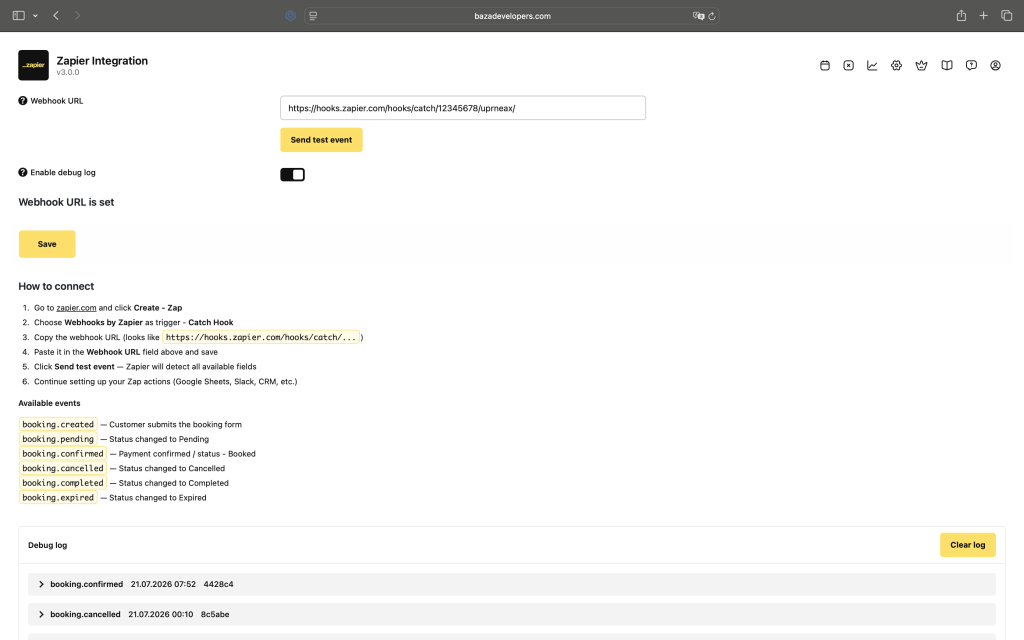
The WordPress booking calendar Zapier integration runs via BBC’s REST API and webhook support. Setup takes about 15 minutes:
- Log in to Zapier (free plan works for basic Zaps)
- Click Create Zap and search for Webhooks by Zapier
- Select Catch Hook and copy the webhook URL
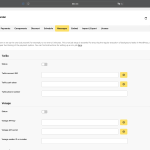
- In WordPress, go to Baza Booking – Settings and paste the URL in the Zapier field
- Test a booking – Zapier catches the data
- Map the fields (name, email, date, service, price) to your app and turn the Zap on
What Booking Data Is Sent to Zapier?
Every triggered Zap includes: client name, email, phone, booking date and time, service name, extras selected, total price, payment method, booking status, promo code, renter role, and client comments. All mappable to any field in any app – no code needed.
Do You Need a Paid Zapier Plan?
The free plan gives you 5 Zaps and 100 tasks per month – fine for testing or a low-volume studio. Most businesses land comfortably on the Starter plan at $19.99/month (750 tasks). The time you save in the first week covers the cost.
Where to Start If You’re Already Using BBC
Start with booking – Google Sheets. It’s the simplest, most useful Zap, takes 10 minutes to set up, and once you see it working the rest follow naturally.
Baza Booking Calendar
turns your WordPress site
into a fully automated booking machine.
The moment a client submits a booking, Zapier connects it to 6,000+ apps instantly – no code, no plugins, no manual triggers.
The Zapier integration is available on Pro and Elite plans. See pricing or ask us about a specific workflow – we’ll help you set it up.
In this category
-
 Amelio: A Smarter, Smoother Booking Experience for WordPress
-
 Beauty Salon Booking Software for WordPress
-
 Best WordPress Booking Plugins in 2026: 10 Solutions Compared
- Booking Calendar for WordPress: How to Streamline Your Booking Process
- Online Booking Plugin for Photo Studios: Why Your Website Needs It
-
 Photo Studio Booking Software for WordPress
-
 Special Offers: Turning a Single Click Into an Upsell
-
 WooCommerce Bookings with Custom Price and Minimum Hours from Product Metadata
-
 WordPress Booking Plugin with Google Calendar - Full Setup Guide (2026)
-
 WordPress Booking Plugin with SMS Notifications: Cut No-Shows with the Right Gateway

