See what a visitor did before the form was sent
Every form entry arrives with the path that led to it. Then charts and funnels show where leads come from and where they leave.
- Pro, Plus and Agency plans
- Entries stay on your site
- Nothing recorded before consent
- Visitor path in entries
- Charts
- Funnels and goals
- Consent first
- No separate analytics account
You get leads and you do not know where they come from
A name and a message, nothing more
A form entry arrives and you know who wrote. You do not know whether they read the prices, came from an advert or opened ten pages.
Adverts and articles with no proof
You pay for adverts and write articles, but cannot say which page or button brings a lead. Analytics shows visitors, the form shows leads, and the two never meet.
Visitors leave and you do not see where
You see that fewer people write than visit, but not where they leave: on the pricing page, at the form, before the button.
Tracking feels risky
Cookie banners and privacy rules make tracking risky. You do not want a tool that records phone numbers or runs before consent.
The path of the visit travels with the form
The plugin's small script keeps the steps of a visit in the browser: pages opened, buttons and links clicked, sections that came into view, how far the page was scrolled (25, 50, 75 and 90 percent) and the first touch of a form.
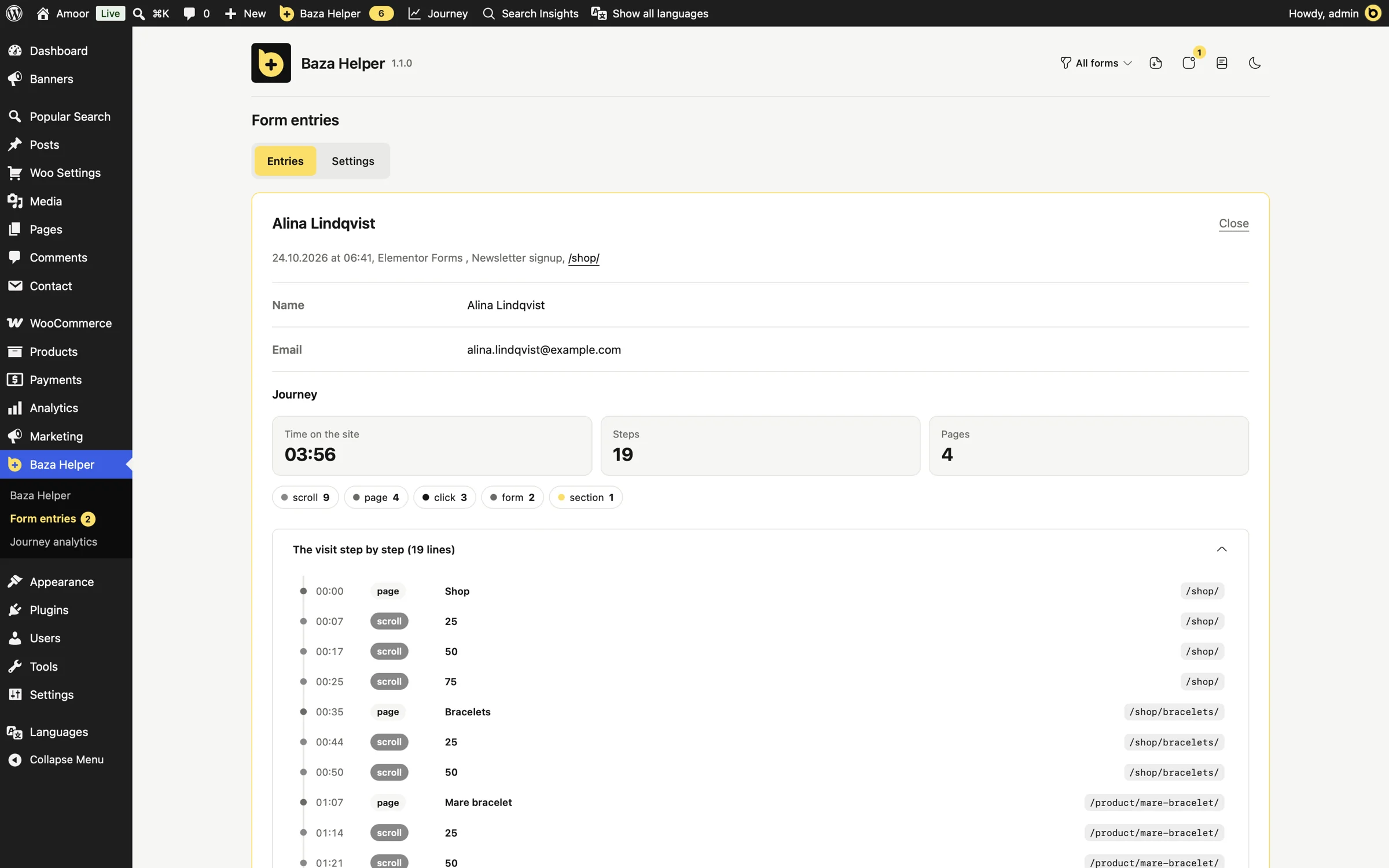
When the form is sent, the path goes with the entry as one field. In the entry it is a readable timeline.
- Time on the site and the number of steps
- Pages and kinds of step, with the time of every step
- Repeats folded into "x N"
Your chat and your site, in sync
The assistant asks your site, not a pile of tables. Baza Helper gathers the answers from Search Insights, Journey analytics and the other tools on your own site, and sends back a short answer. The raw rows stay with you, so the chat spends fewer tokens.
Then the assistant sends the fix as a proposal, and Content Review, WooCommerce or your pages change only after you press Apply.
- One connection for Content Review, Journey analytics, Search Insights and WooCommerce
- Raw rows stay on your site, and the chat gets a short answer
- Every change is a proposal that you approve
Charts for every entry with a path
The "Journey analytics" page draws all entries that carry a path, filtered by form and by period: 7, 30, 90, 365 days or all.
- Time on the site before sending, and steps per visit
- What visitors did, and the most used buttons and sections
- Pages with most activity, and where visits began
- The last step before sending, and entries and average time for the last 30 days
- Four figures on top: entries with a journey, average time, median time, average steps
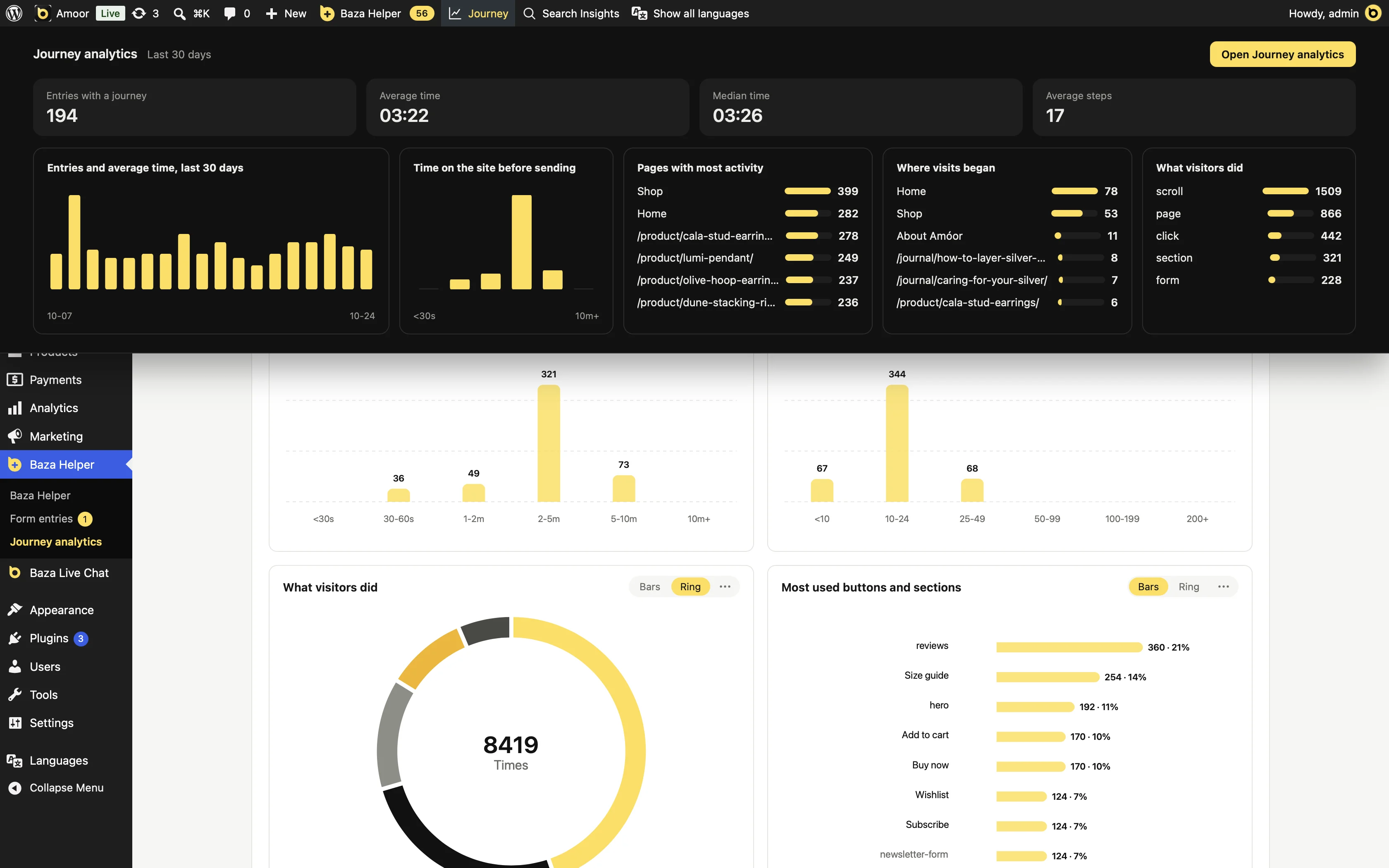
- A "Journey" item in the admin bar opens a pop-over with a short summary and small charts of the last 30 days, from any page of the admin
Funnels in minutes
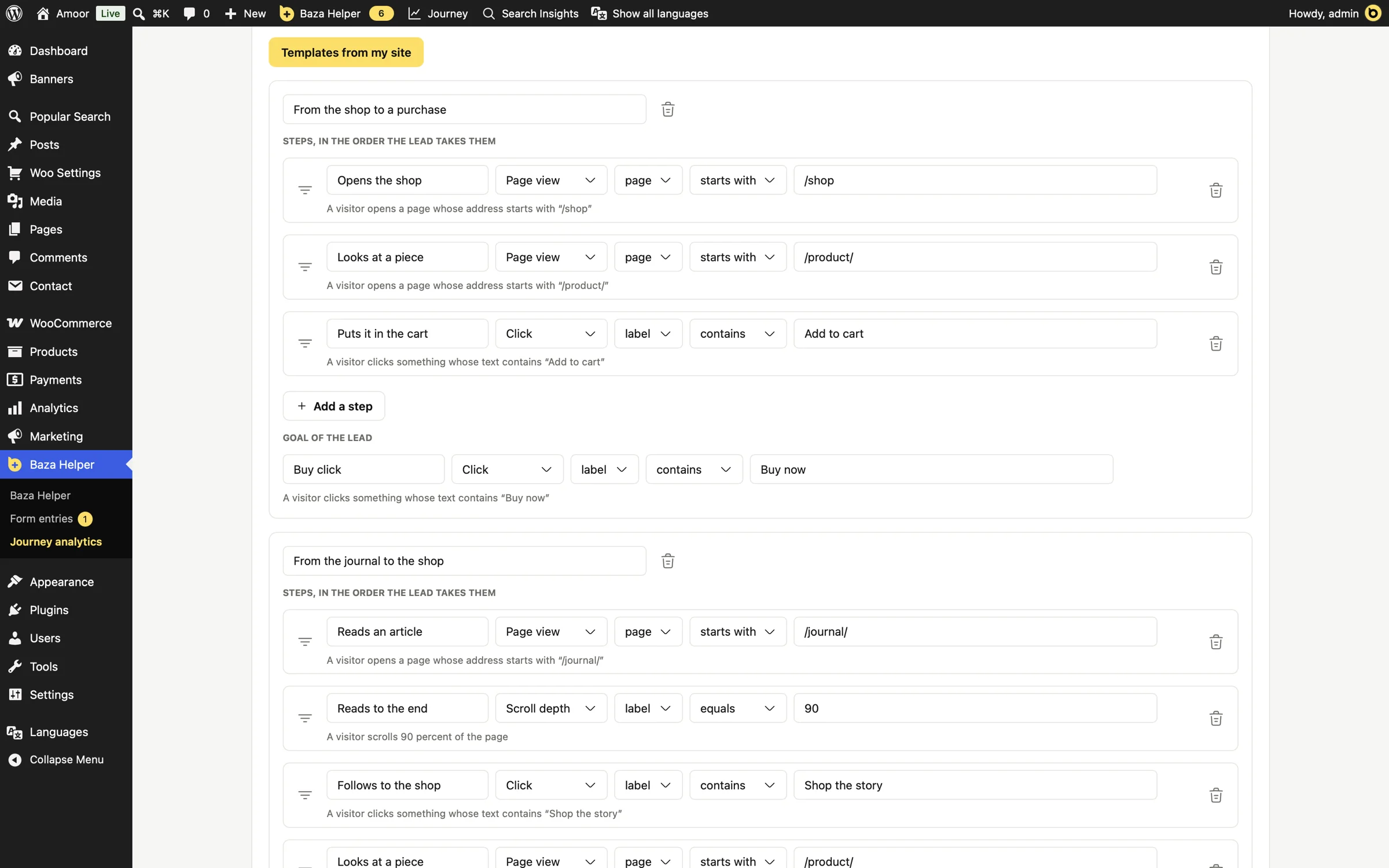
You describe the steps a lead takes and the goal it ends in. For example: the pricing page, a click on the order button, the form. The goal is that the form is sent.
"Templates from my site" scans the site and offers ready funnels built from what it really has. A template the site cannot support is shown as not available, with the reason.
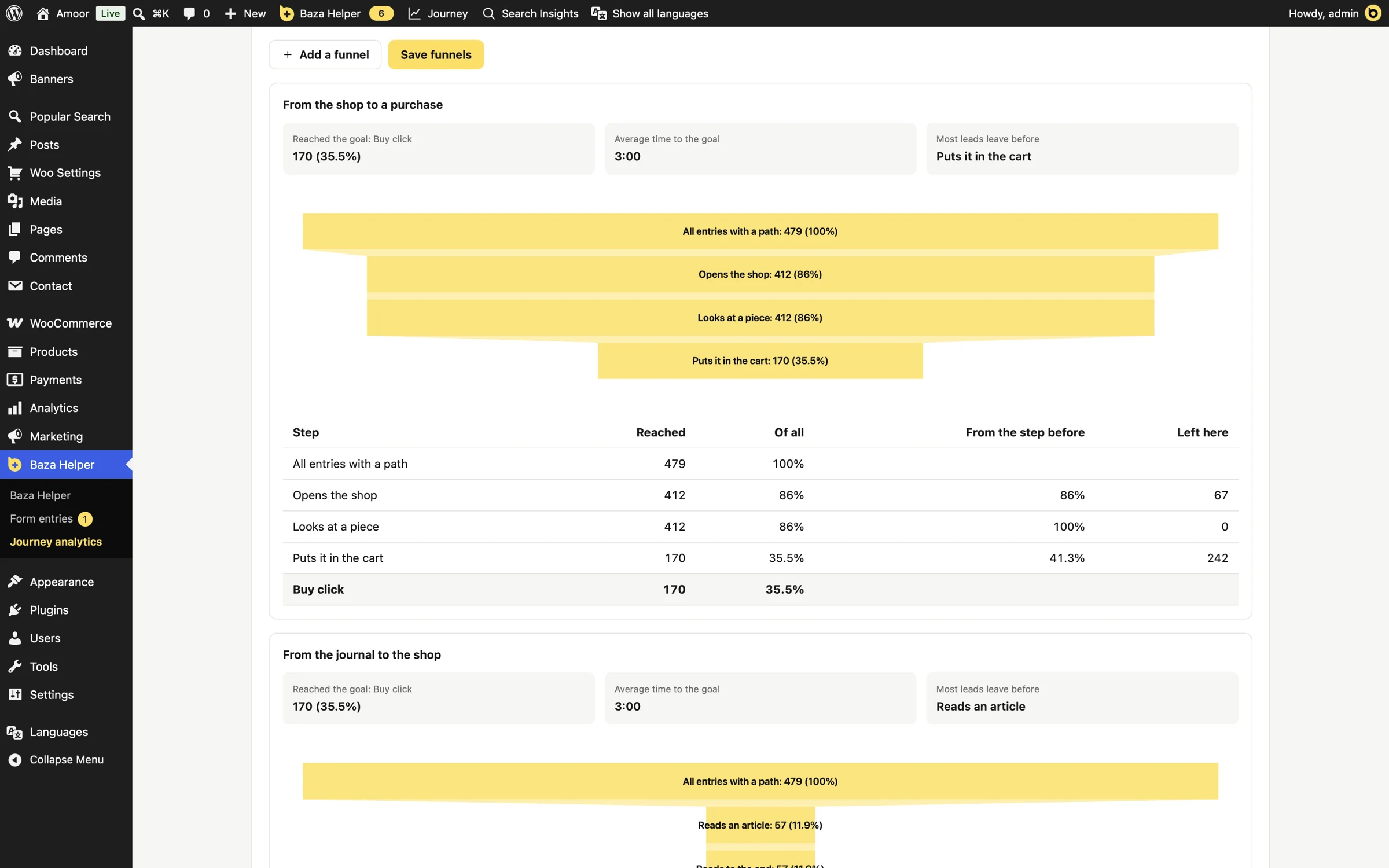
- How many leads reached each step in order, and the share of all
- The conversion from the step before, and how many left at each step
- The step where most leads leave, and for the goal: how many reached it and the average time to it
- Each rule is also written as a sentence, and a guide, "How funnels work", sits above the editor
- Up to 10 funnels with 12 steps each, matched in every language of a multilingual site
Nothing is recorded before consent
The steps live in the browser session only. The script sends nothing by itself: the form carries the path. When consent is withdrawn, everything is dropped.
- Nothing is collected before the visitor accepts analytics in the cookie banner
- The path travels only inside the form that the visitor sends
Follow every lead from the first click to the form
Screens of a made-up shop, Amóor, filled with demo data.
- 01 / 10
See the whole visit, not just the form
Every lead arrives with the path that led to it: where it landed, what it clicked, how long it stayed.
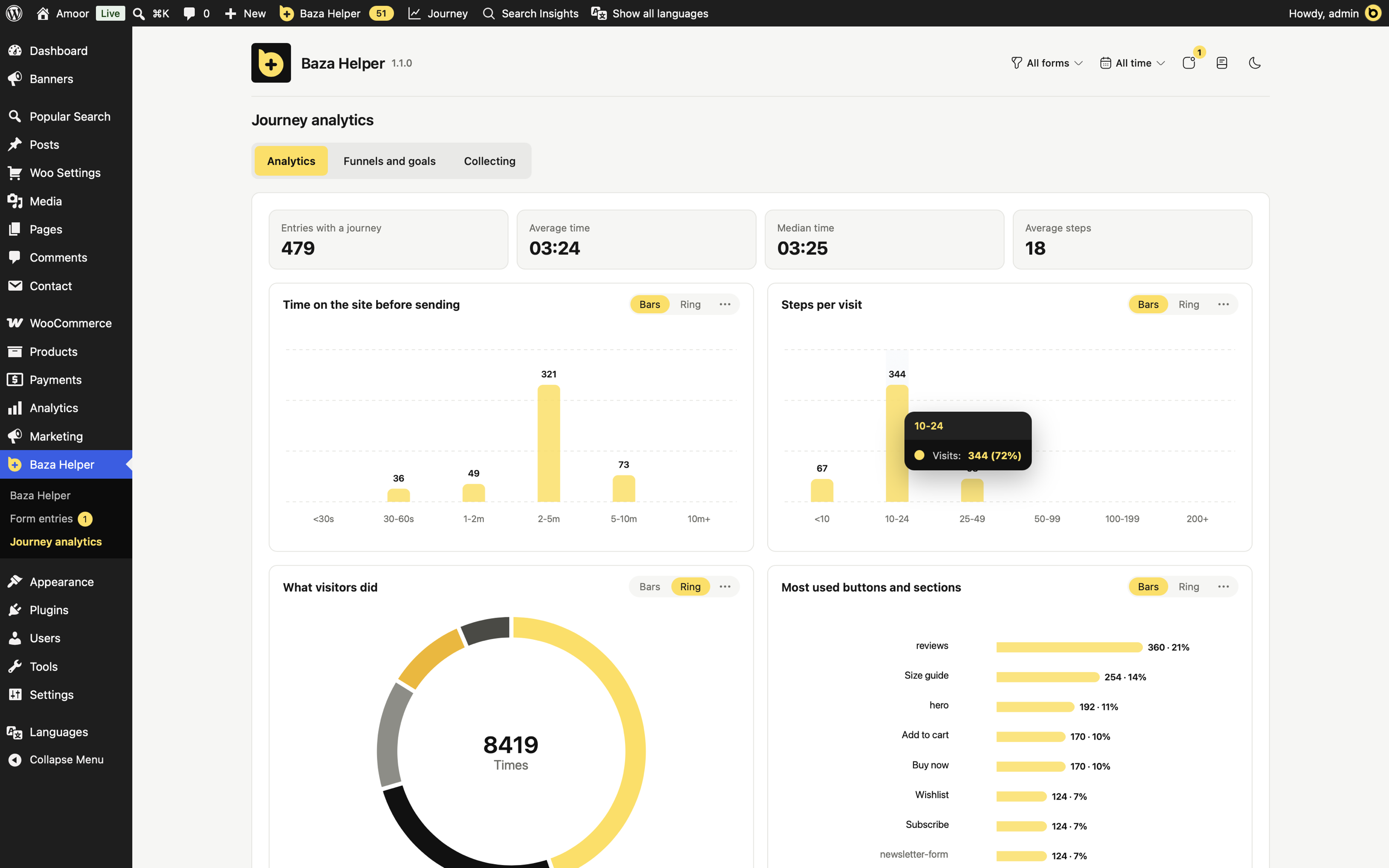
- 02 / 10
Spot the day a campaign worked
Entries per day next to the average visit length: the peak and what it did to the quality of the visits.
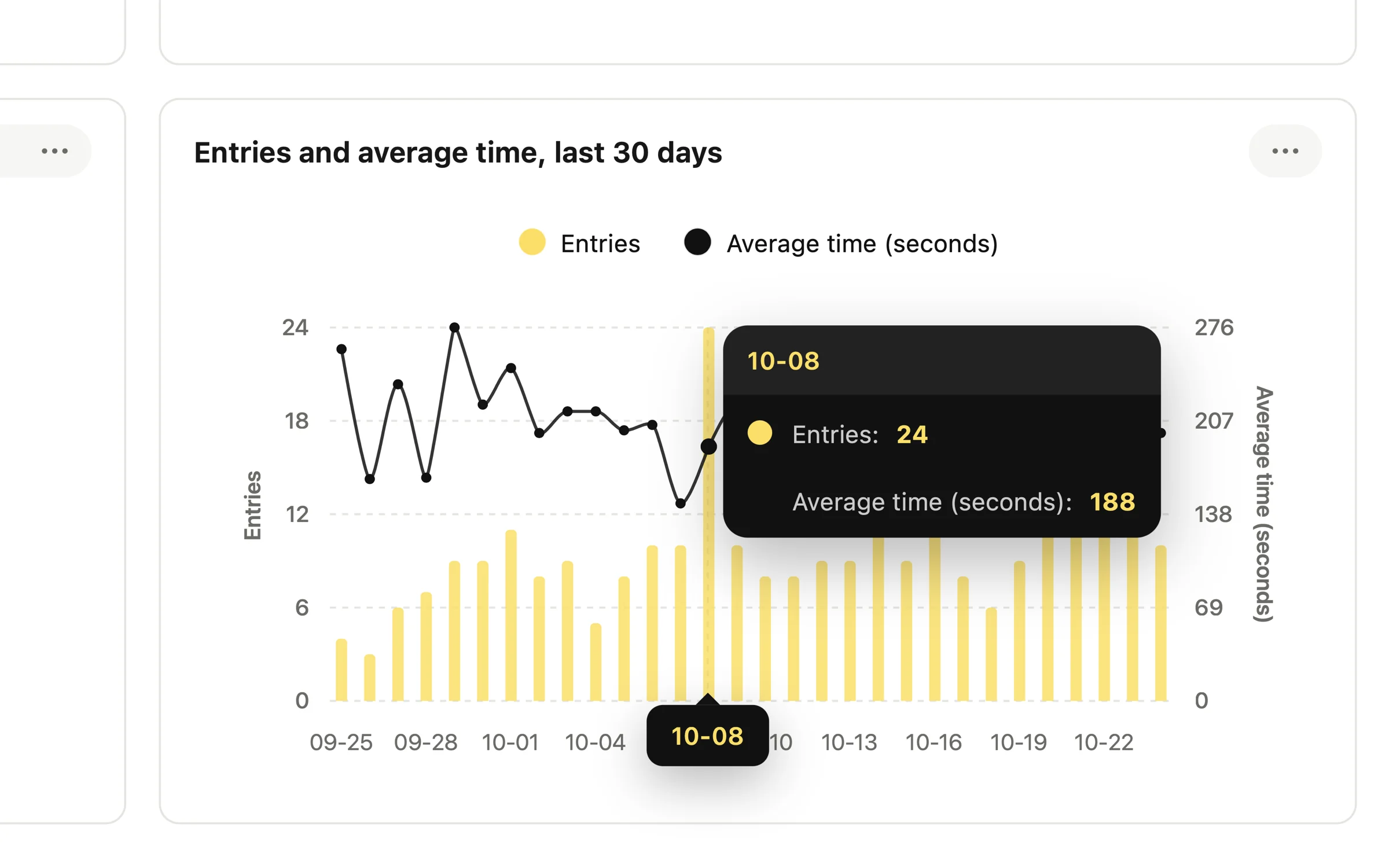
- 03 / 10
How long, how deep
Visit length and number of steps, grouped so a pattern is visible at a glance.
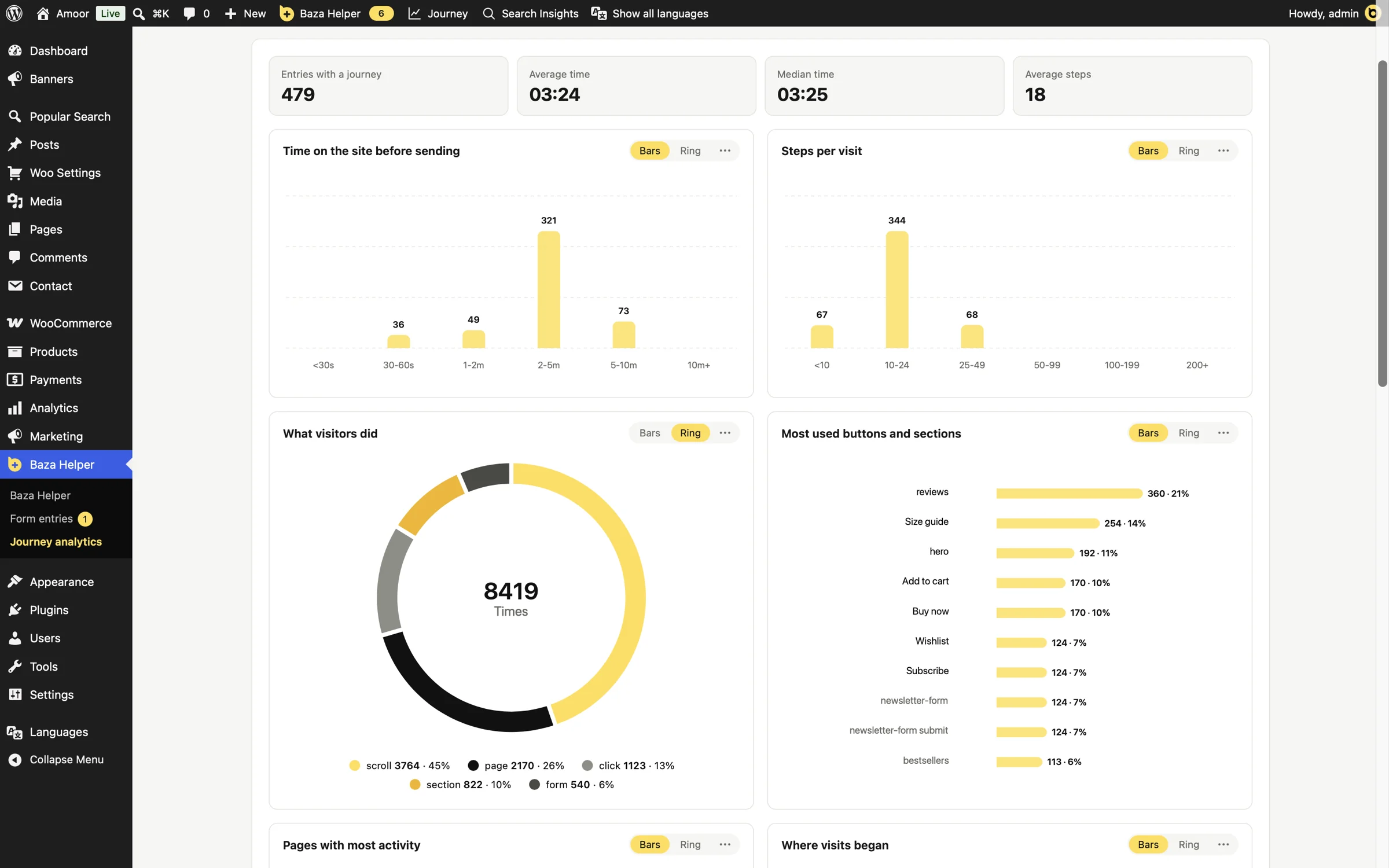
- 04 / 10
What they click, where they land, where they stop
The buttons that matter, the pages that carry the visit and the last thing a visitor did before leaving.
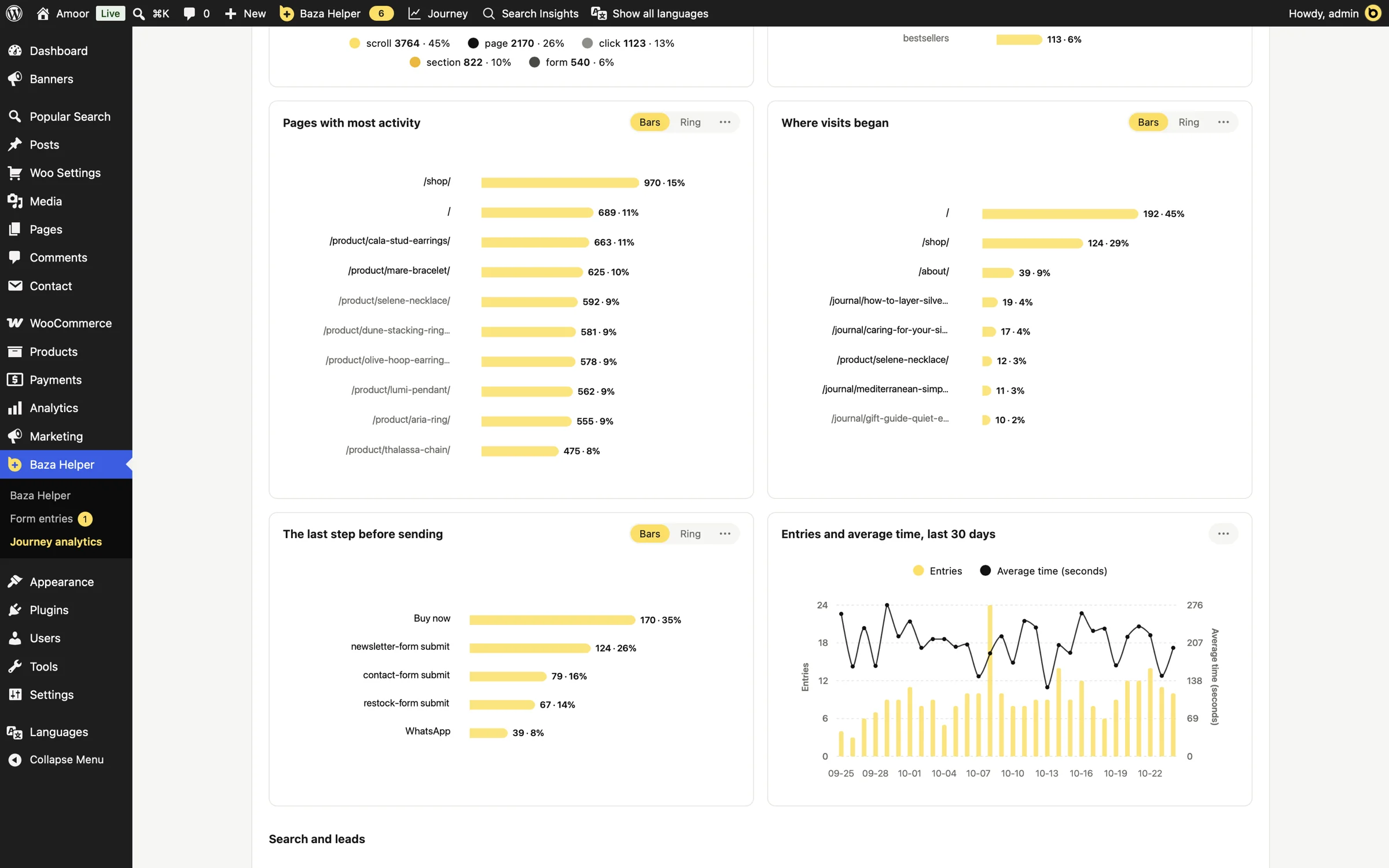
- 05 / 10
Replay one visitor, second by second
Landing, scrolling, the collection, the piece, the cart: the full path of one buyer in a readable timeline.
- 06 / 10
See exactly where people drop out
Shop, piece, cart, purchase. The step with the biggest fall is the one to fix first.
- 07 / 10
Build a funnel in plain words
Each step says in a sentence what it looks for. No tags, no event names, no code.
- 08 / 10
Analytics one hover away
A short summary and charts across the whole screen, from any page of the admin.
- 09 / 10
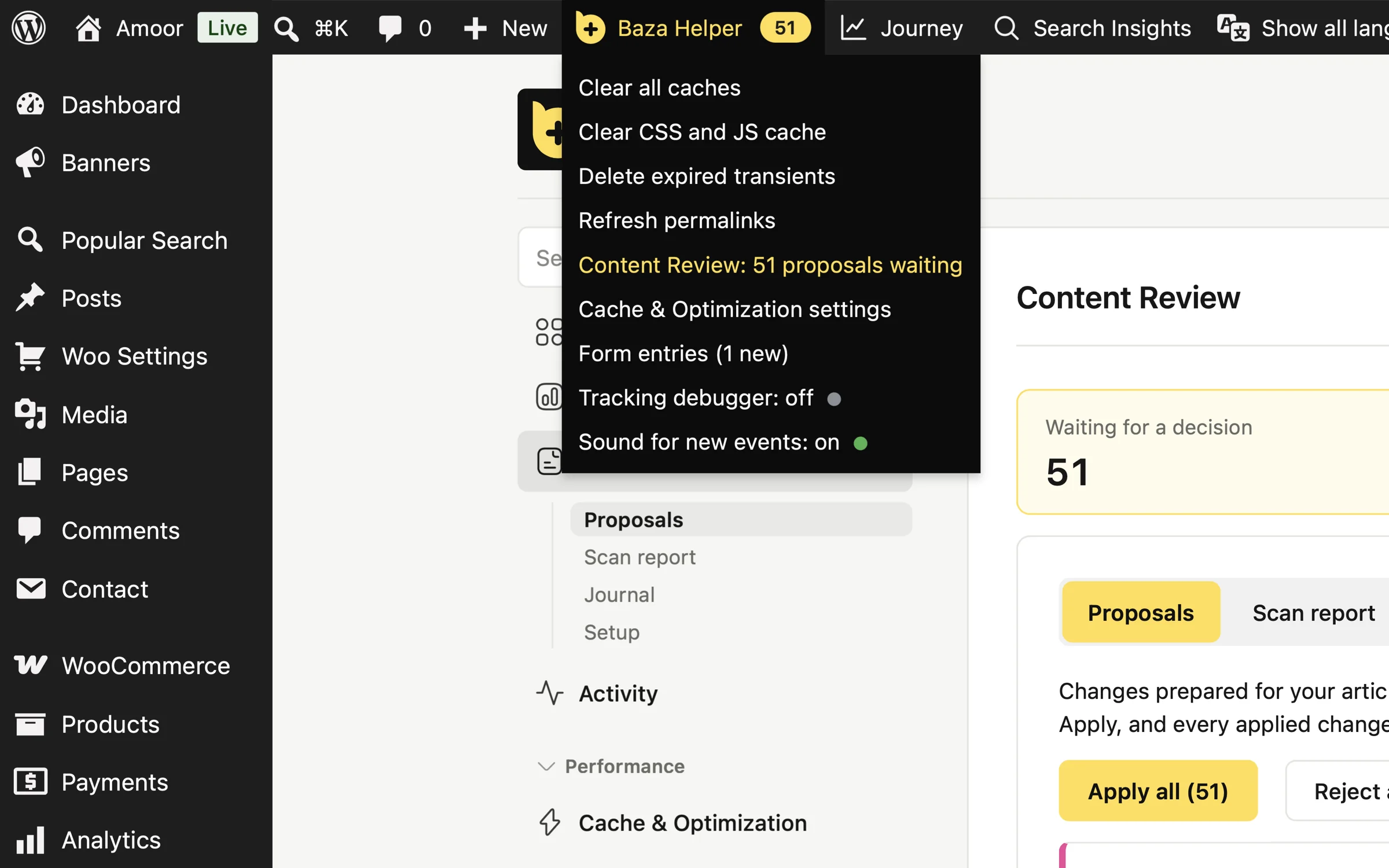
Live, with a quiet chime
New entries and proposals appear without a reload, with a soft low chime you can turn off.
- 10 / 10
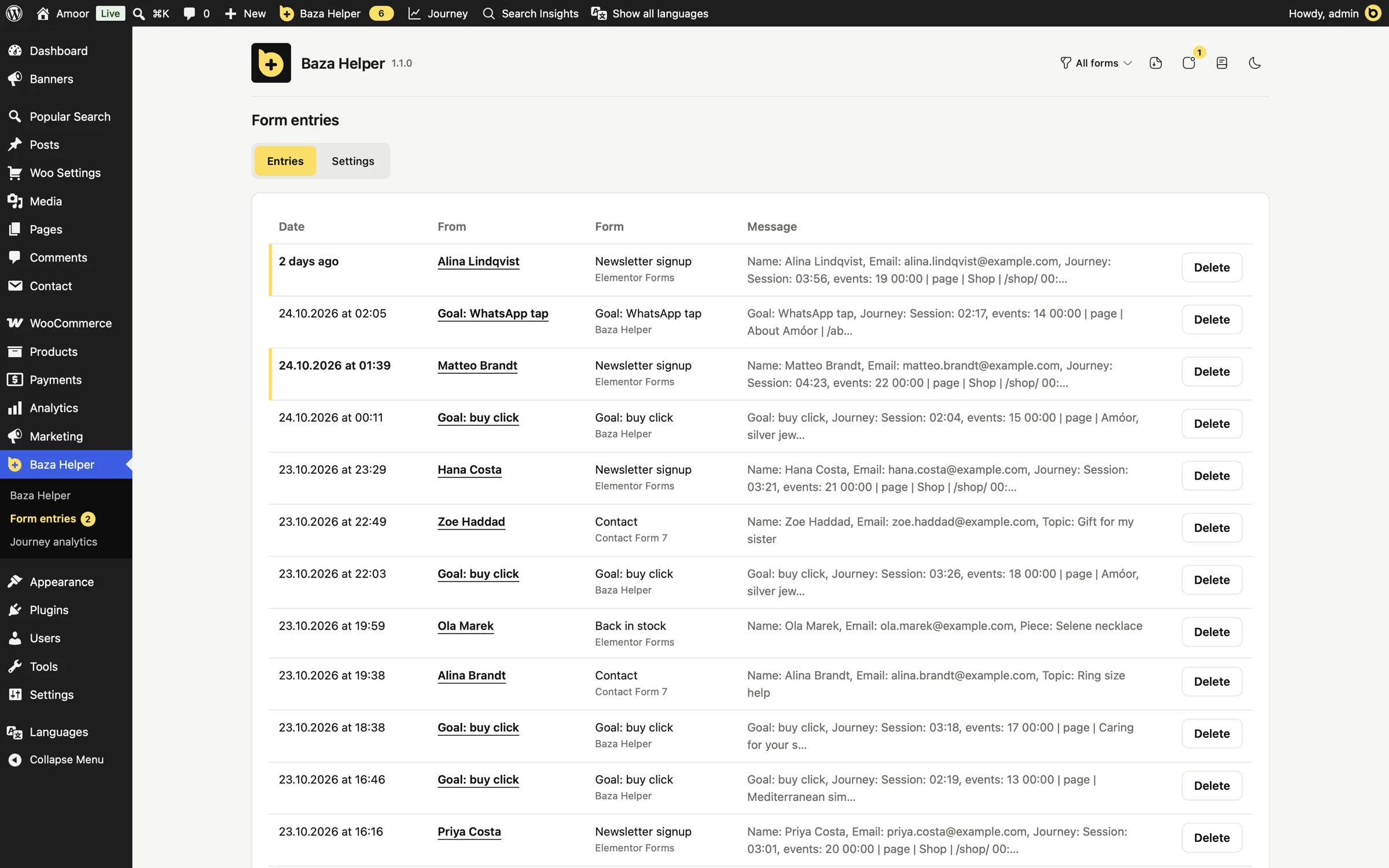
Every buy click is an entry too
Taps on buy buttons are counted as goals, silent and without an alert, ready to be filtered and analysed.
What is recorded and what is not
The tool is built to respect consent. The site owner stays responsible for the consent text.
Recorded
- Pages opened, and buttons and links clicked
- Sections that came into view, and how far the page was scrolled
- The first touch of a form, as a step with no field value
- A phone link as "phone" and an e-mail link as "email", nothing more
Not recorded
- Field values, names, e-mail addresses or phone numbers
- Query strings, never
- Long numbers or codes in an address, such as an order or a user, which are hidden
- Anything before the visitor accepts analytics
Entries stay on your own site, in your database. Baza Helper provides the WordPress tools to export and erase them with the personal data tools.
The same entry, with the story behind it
| Without Journey analytics | With Journey analytics |
|---|---|
| You know the name and the message | You also see the pages, clicks and scroll before the form |
| Analytics shows visitors, the form shows leads | The two meet in one entry |
| You guess where visitors leave | A funnel shows the step where most leads leave |
| Tracking runs whenever the page loads | Nothing is recorded before consent |
| An empty report with no explanation | The check "Why is it empty?" lists the reasons |
Made for people who run sites that need leads
A business owner
You see which pages and buttons come before an enquiry, so you know where the site needs work. No separate analytics account is needed.
A freelancer with client sites
You show a client the path behind each lead and the step where leads leave, from the site you already look after.
An agency
Funnels come from templates built on each site, in every language of a multilingual site, so one method fits every client.
What it needs, and what it does not do
A Pro, Plus or Agency plan
Journey analytics is a Pro tool and is included in every paid plan. It is not in the free WordPress.org version.
Forms that Baza Helper records
Entries from the Form entries tool carry a path, and so do orders of the classic WooCommerce checkout. The block checkout is recorded without a path.
Visitors who accepted analytics
Only entries sent after the visitor accepted analytics carry a path. When none appears, the check "Why is it empty?" lists the reasons.
Limits, plainly
- Only entries that carry a path count: visitors who accepted analytics before they sent the form.
- It reads form entries. It is not a replacement for a visitor analytics service and does not count visitors who never send a form.
- Button texts differ per language: a rule for a button needs the texts of the other languages added, separated by |. Pages are handled by the templates.
Questions before you start
Does it work without the cookie banner?
Paths are collected only after a visitor accepts analytics in the cookie banner. Without that consent there is no path, so a banner that records consent is part of the setup.
What exactly is recorded, and are phone numbers or e-mails stored?
Pages, clicks, sections in view, scroll depth and the first touch of a form. No field values, names, e-mails or phone numbers. A phone link is recorded as "phone", an e-mail link as "email". Query strings are never recorded.
Why is my path empty?
The check "Why is it empty?" lists the reasons: the script, the licence, the setting, analytics tracking, consent, cached pages, or entries sent before collecting began.
Does it work on a multilingual site?
Yes. Pages are matched in every language of a multilingual site, whichever plugin runs the languages. Button texts differ per language, so a rule for a button needs the texts of the other languages added, separated by |.
Does it work with my form plugin?
It works with the forms that the Form entries tool records, and with the classic WooCommerce checkout. Orders of the block checkout are recorded without a path.
Do I need a separate analytics account?
No. There is no account and no third party. The tool reads the entries on your own site.
Know where your leads come from
Journey analytics is included in the Pro, Plus and Agency plans.