Your Search Console data, kept on your site and ready for your AI assistant
Connect Google Search Console once. Baza Helper copies your search data to your own database every day, finds the pages that lose clicks, and lets your assistant ask for the answers, so you stop pasting tables into a chat.
- Pro, Plus and Agency plans
- Read-only access to Google
- Your data stays in your database
- Search Console
- Pages that lose clicks
- Queries that compete
- Close to page one
- Indexing status
- IndexNow
- MCP
You ask an assistant about your traffic and paste tables by hand
Tables pasted into a chat
To ask which of your pages lose traffic in Google, you export data from Search Console by hand, paste tables into the chat, and repeat it every week.
Google forgets, and so does the chat
Google keeps only about 16 months of data and limits the export, and the assistant does not remember what you gave it last time.
Connectors cost money and share your data
Third-party connectors need an account and a monthly fee, and your data goes to someone else.
Connect once, then just ask
Baza Helper copies your performance data to your own site every day and analyses it there. Your assistant asks for the answers through a read-only link with its own key, or through an MCP address.
Then it proposes the fix (a new title, a description, an internal link) as a Content Review proposal. Nothing changes until you press Apply.
- You ask in plain words, with no tables to export
- Nothing goes to a third party
- Tabs for Claude, ChatGPT and Gemini with ready text and settings to copy, and the same for any assistant that runs commands or sends web requests
Your chat and your site, in sync
The assistant asks your site, not a pile of tables. Baza Helper gathers the answers from Search Insights, Journey analytics and the other tools on your own site, and sends back a short answer. The raw rows stay with you, so the chat spends fewer tokens.
Then the assistant sends the fix as a proposal, and Content Review, WooCommerce or your pages change only after you press Apply.
- One connection for Content Review, Journey analytics, Search Insights and WooCommerce
- Raw rows stay on your site, and the chat gets a short answer
- Every change is a proposal that you approve
Read-only, the way you prefer
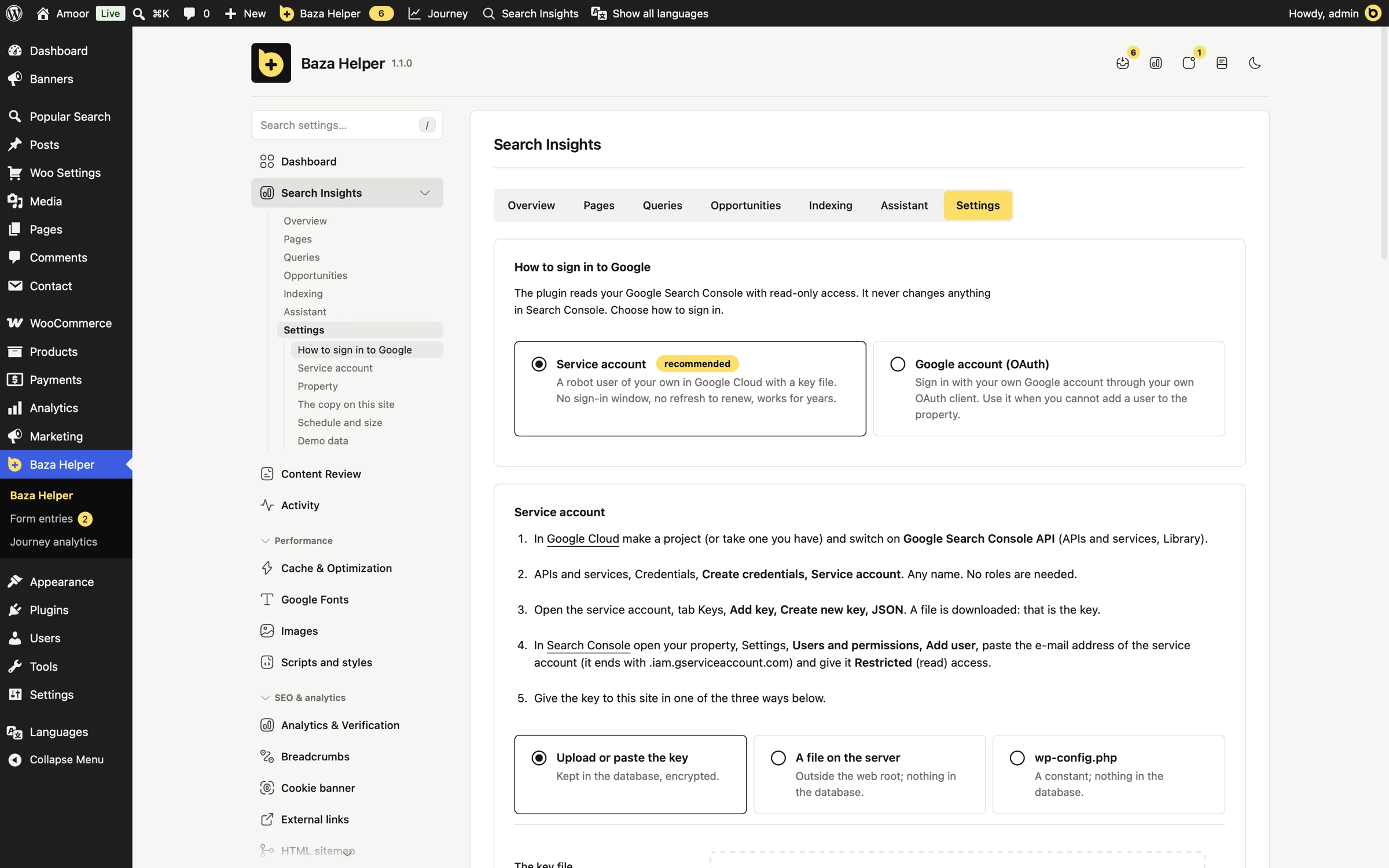
Use a service account (recommended): a JSON key from Google Cloud, added to Search Console as a user with read access. Or use your own Google OAuth client and a "Connect with Google" button.
Pick the property from the list the account can see, a domain or a URL prefix, and press "Test the connection": it says in plain words what is wrong.
- The key is kept encrypted, read from a file outside the web root, or taken from a constant in wp-config.php so it is never in the database
- With OAuth the site keeps only the refresh token, encrypted
- It only reads: it never changes anything in Search Console
- Choose the JSON key file or drag it onto the screen, no copying of text
The history stays with you
A daily job copies clicks, impressions, CTR and position by day, page and query into a table of your own database. The first connection fills the history in small steps, as many days back as you choose, from 7 to 485.
Google keeps about 16 months and its data is about 2 to 3 days late. The longer the plugin runs, the more history you own.
- Keep it from 30 to 485 days, 480 by default, with a limit of rows per day
- Choose the hour of the daily copy, the kind of search (web, image, video, news, Discover, Google News), and final or fresh data
- A "Sync now" button when you do not want to wait
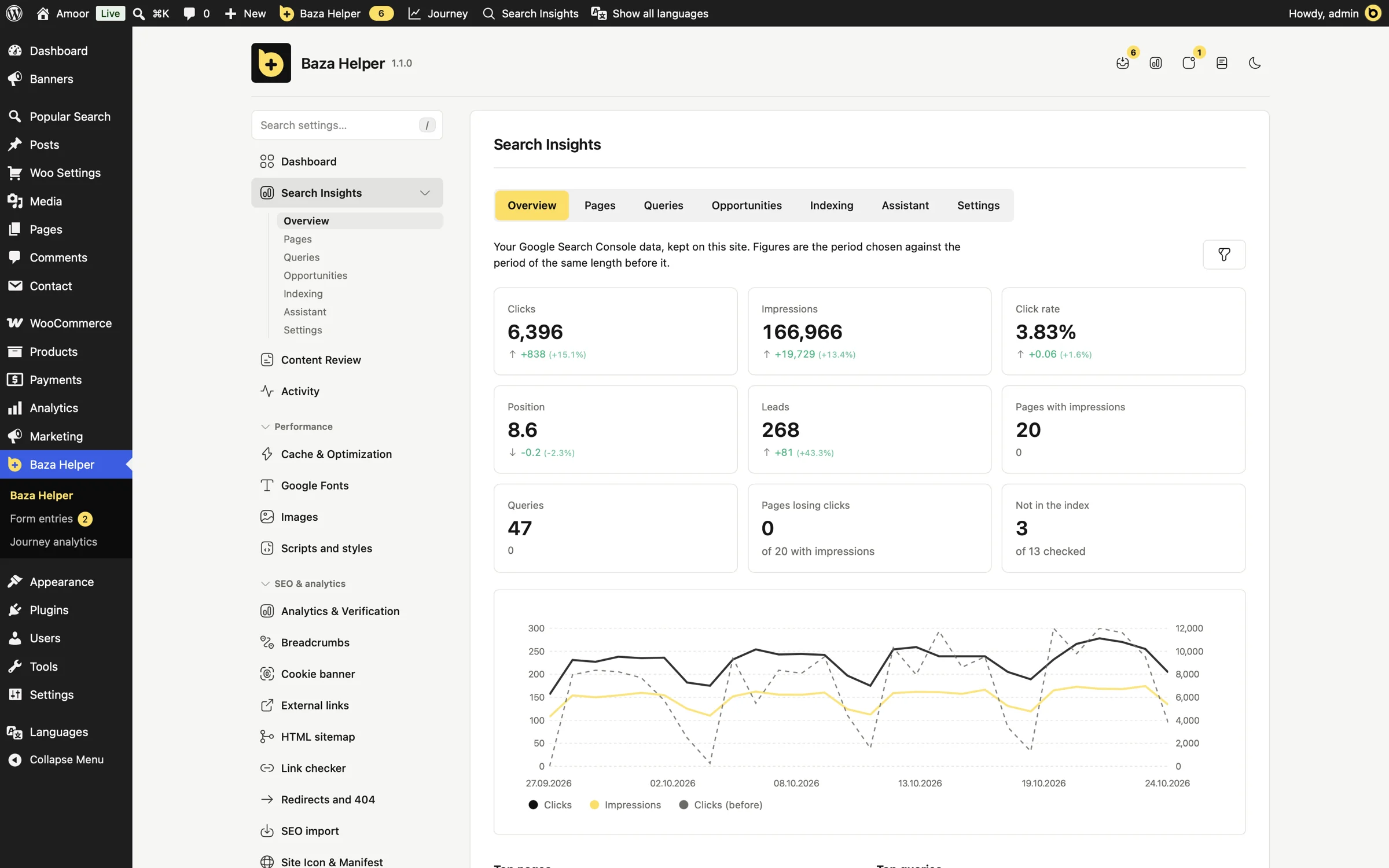
- A small dashboard inside WordPress: clicks, impressions, CTR and position against the previous period, the daily curve, top pages and queries, and a block with the last 28 days on the Baza Helper dashboard
- A "Search Insights" item in the admin bar, next to "Journey", opens a pop-over with the last 28 days: four figures with their change, clicks and impressions by day, and the pages and queries with the most clicks
- "Load demo data" fills the screens with the figures of a made-up shop, so you can try them before Google is connected, and "Remove demo data" takes only that back
Answers, not raw rows
The analysis runs on your site, so no raw rows are fed to the model. The assistant gets what you would look for yourself.
- Pages that lose clicks (content decay)
- Queries that several of your pages compete for (cannibalisation)
- Pages with many impressions and few clicks, or a position just below page one
- A comparison of two periods, and the full story of one page
- Leads next to clicks: with Journey analytics, each page shows the form entries that began on it (only visitors with a saved path are counted)
- Pages, queries and opportunities: one filter icon opens the sort, the order, the period and the rows per page (10, 20, 50 or 100), remembered for each person
- "Task for the assistant" on a page: one button builds a ready text with the figures of the page, why it is worth work and how to hand in proposals, and copies it
- Changes applied in Content Review are marked on the overview chart and on the chart of the page, on the day they were applied
Is the page in Google, and if not, why?
The URL Inspection API tells you whether a page is indexed, which address Google chose as the main one, when it was last crawled and why a page is not in the index. The status of your sitemaps is there too.
IndexNow tells Bing and other search engines that support IndexNow about changed pages: with a button, from a list of addresses, and automatically when a post is published, updated or removed.
- The IndexNow key file is served by the plugin
- "Scan all pages of the site" checks every page in Google, 10 at a time, within the daily limit, and goes on by itself in the background
- URL Inspection has a daily quota set by Google, about 2000 per property per day
Know when Google asks for a page that is gone
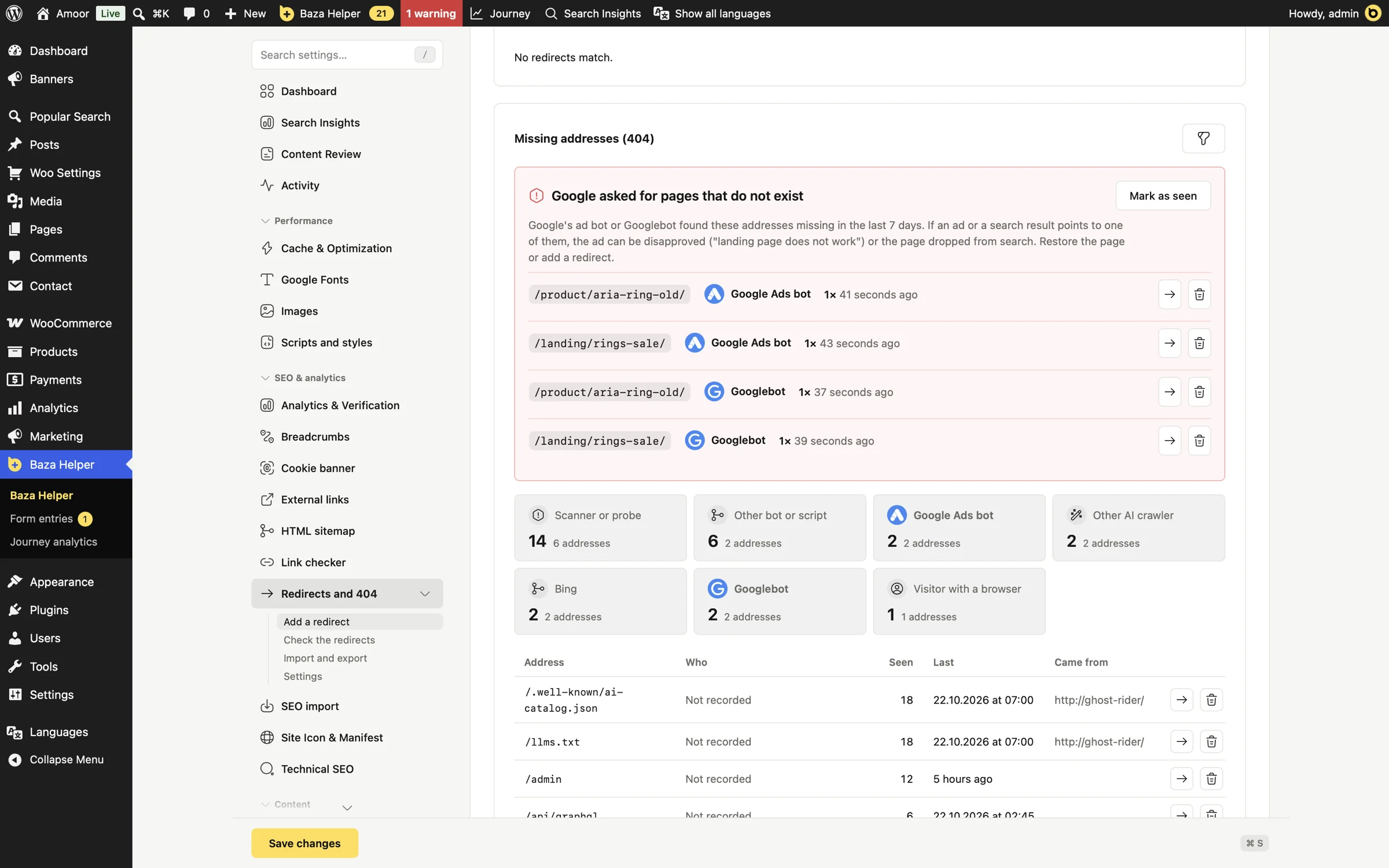
Next to Search Insights, the Redirects tool of Baza Helper keeps the list of missing addresses and says who asked for each one: the Google Ads bot, Googlebot, Bing, AI crawlers, SEO services, scanners or a visitor with a browser.
When the Google Ads bot or Googlebot finds a missing page, a red alert lists the address and the admin bar shows a warning. An ad that points to a missing page can be disapproved, so you restore the page or add a redirect before that happens.
- A search engine that publishes how to check it (Google, Bing, Yandex, Baidu, Apple) is checked as genuine, and a pretender never raises the alert
- Requests for files such as .env or wp-config are marked as probes, whatever the visitor calls itself
- A button on each address opens the redirect form with that address filled in
- The visitor's address is not kept unless you switch it on, and then only its network part
Three ways in, each with its own sign-in
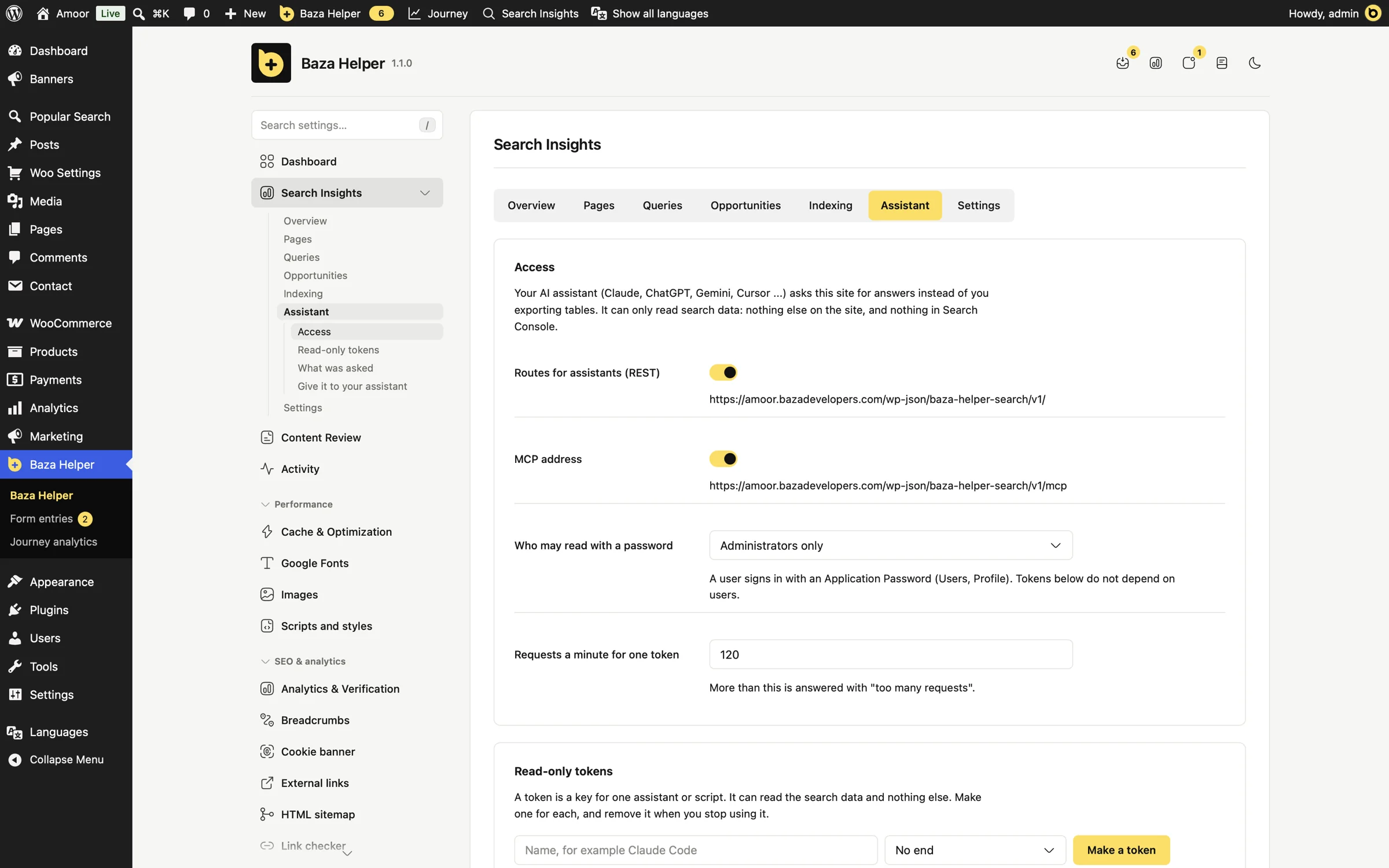
Read-only API routes with an Application Password, read-only tokens with a name, an optional expiry and a "last used" time, or an MCP address that uses the same tokens.
- A token only reads search data and can do nothing else on your site; revoke it at any time
- MCP works with clients that can send an Authorization header, for example Claude Code and Cursor
- Web connectors that insist on OAuth (ChatGPT, claude.ai) are not supported yet
Your search data, on your site and ready to ask
Screens of the Search Insights tab in Baza Helper.
- 01 / 10
Your search traffic at a glance
Clicks, impressions, CTR and position against the previous period, with the daily curve and the top pages and queries.
- 02 / 10
Connect Google once, read only
A service account or your own OAuth client, a property from the list, and a test that says in plain words what is wrong.
- 03 / 10
Give your assistant its own key
Read-only tokens, an Application Password or an MCP address, with ready text to copy into your assistant.
- 04 / 10
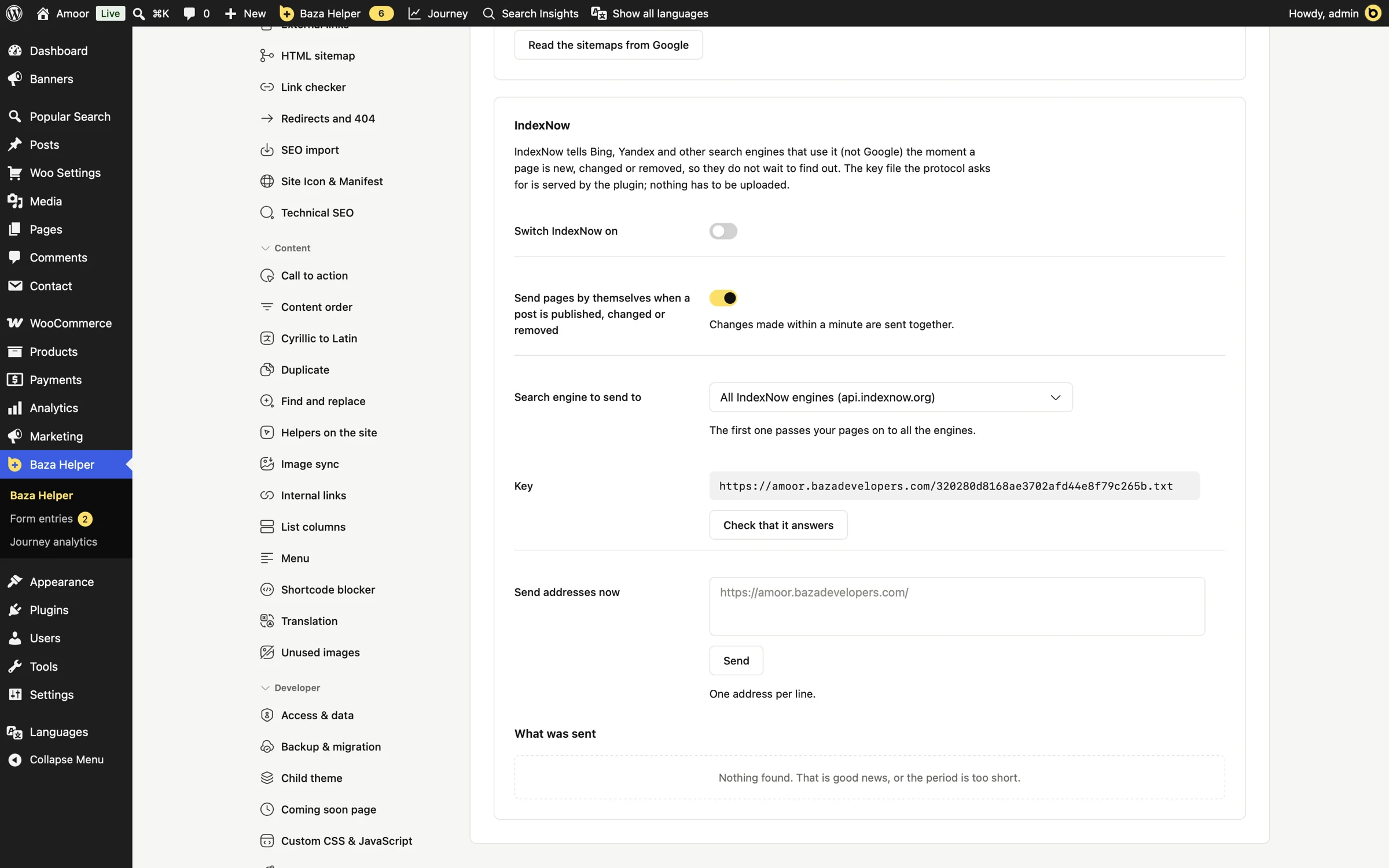
Tell search engines about changes
IndexNow with a button, a list of addresses, or automatically when a post is published, updated or removed.
- 05 / 10
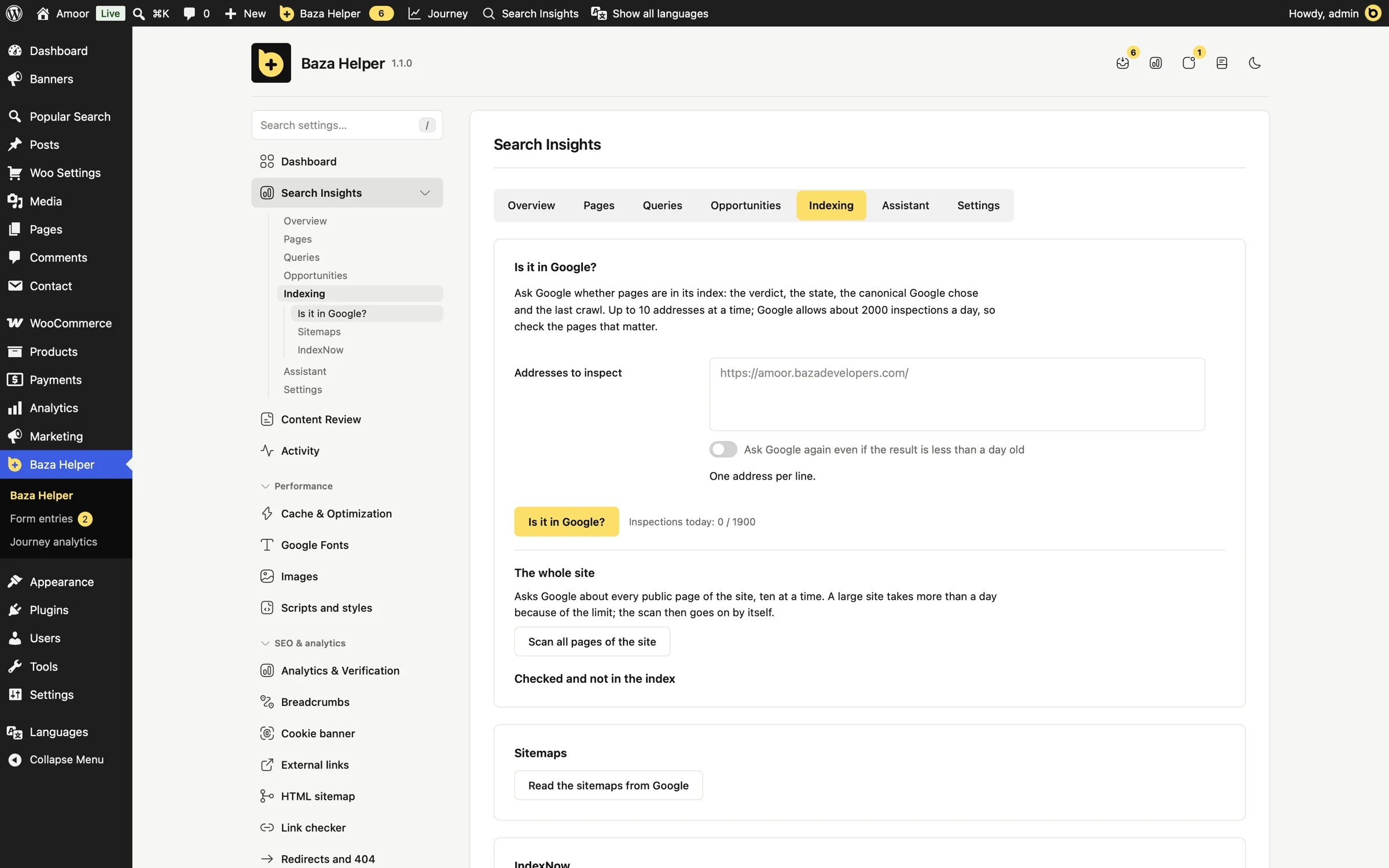
Check every page in Google
One button asks Google about every page of the site, ten at a time, and carries on by itself in the background within the daily limit.
- 06 / 10
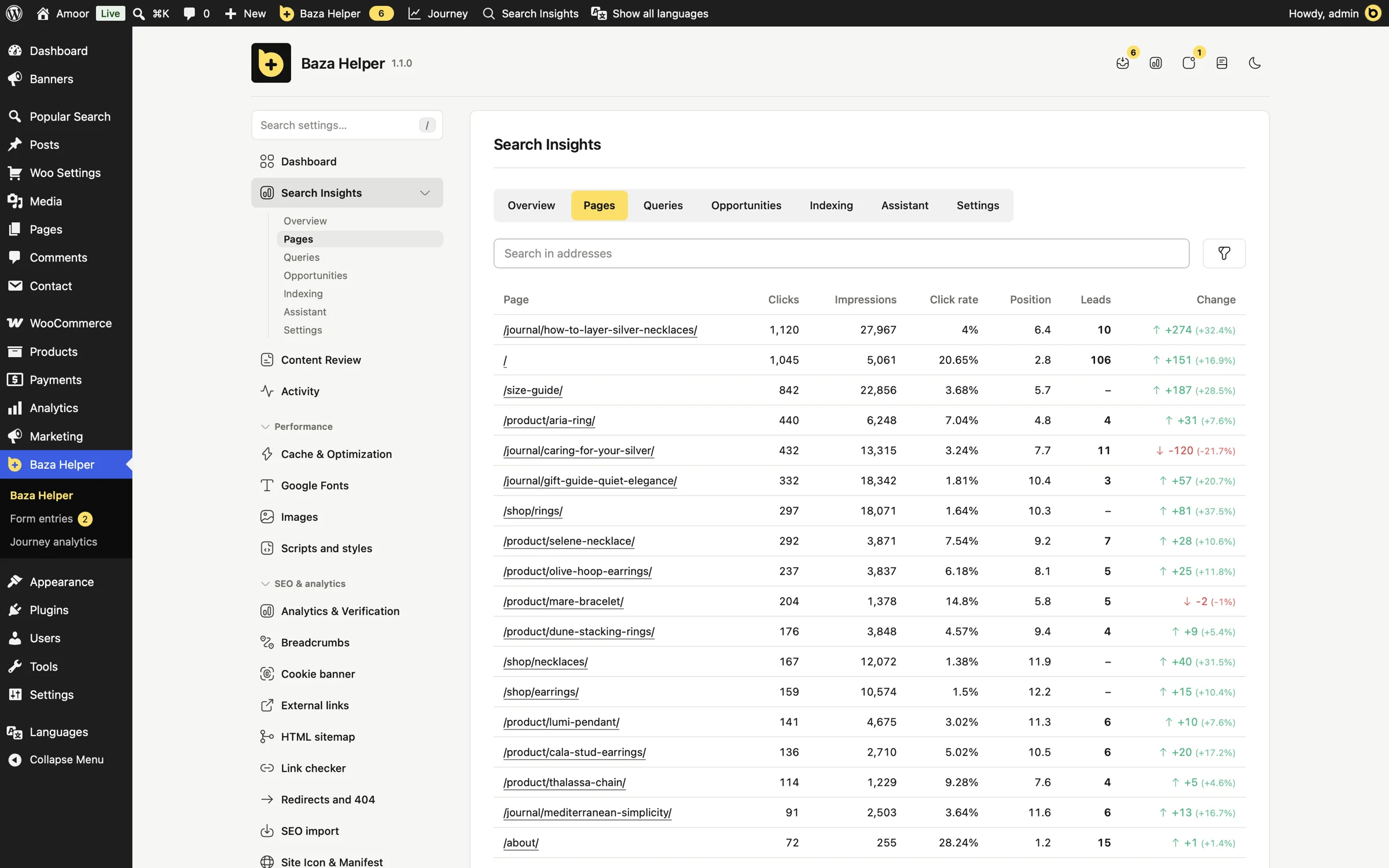
See which pages bring leads
With Journey analytics, each page shows the form entries that began on it, next to its clicks. Sorting, period and rows per page are remembered.
- 07 / 10
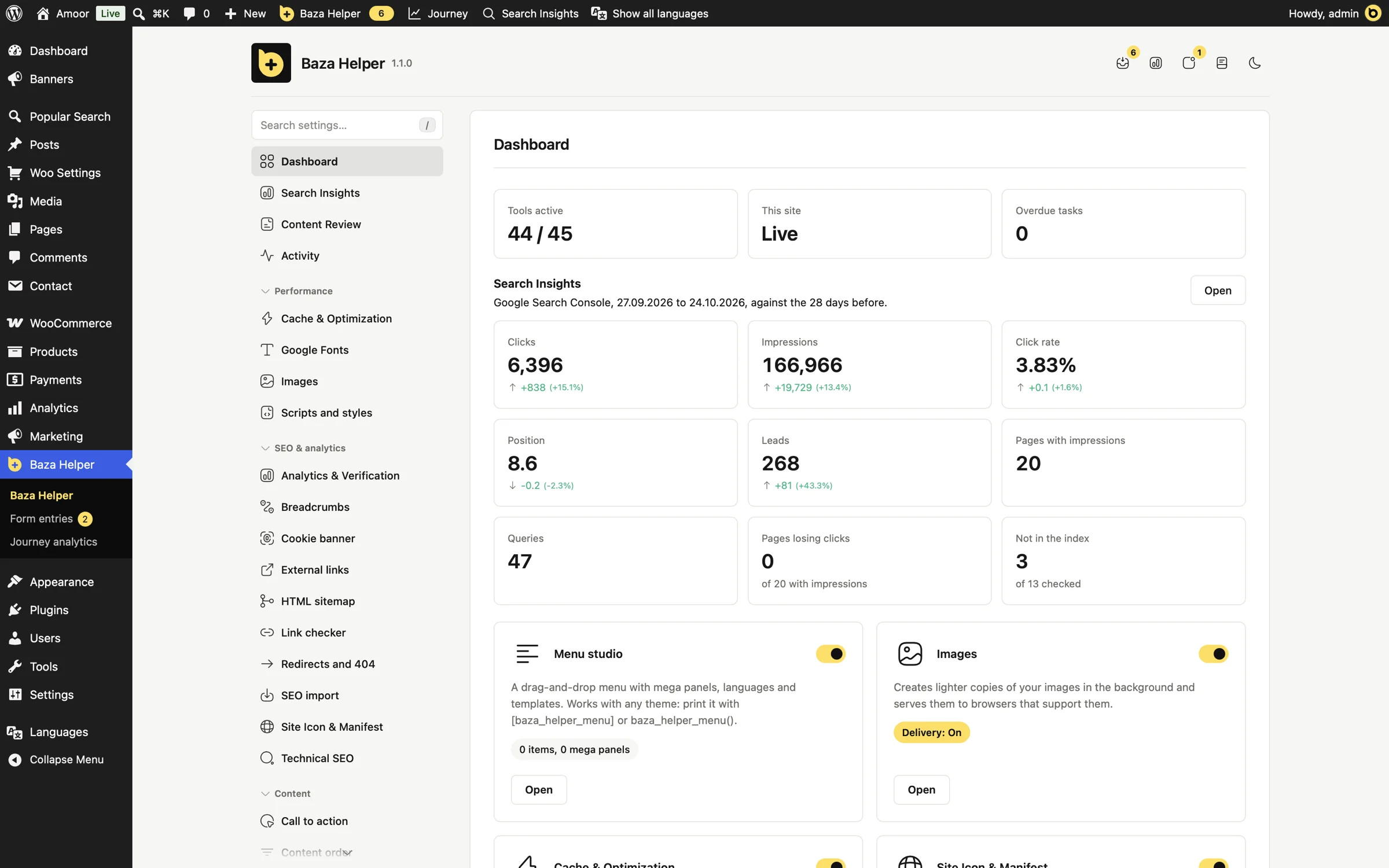
Search traffic on your dashboard
A block on the Baza Helper dashboard shows the last 28 days at a glance.
- 08 / 10
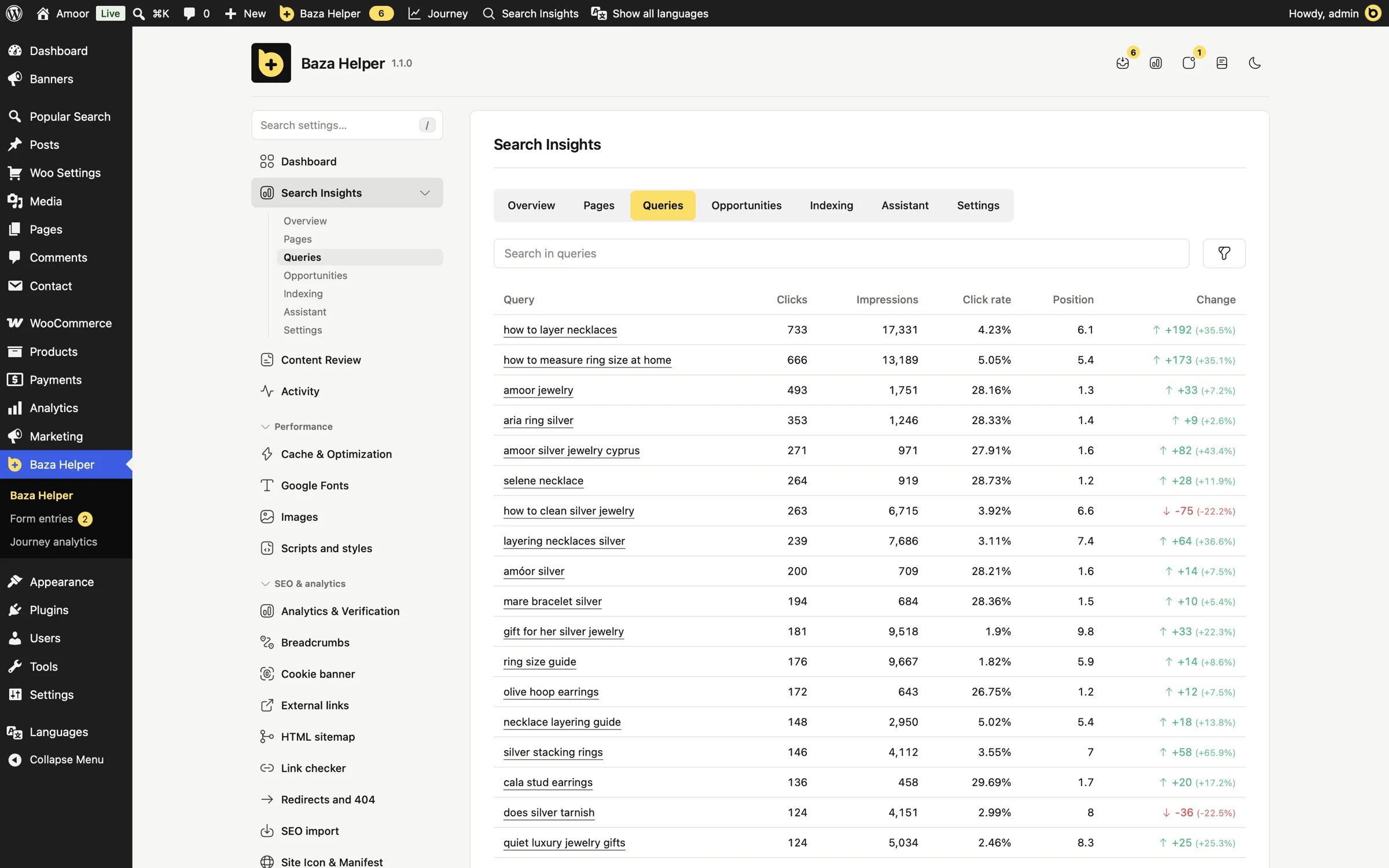
Every query, with its change
All your queries with clicks, impressions, click rate and position, against the previous period, and a box to search in them.
- 09 / 10
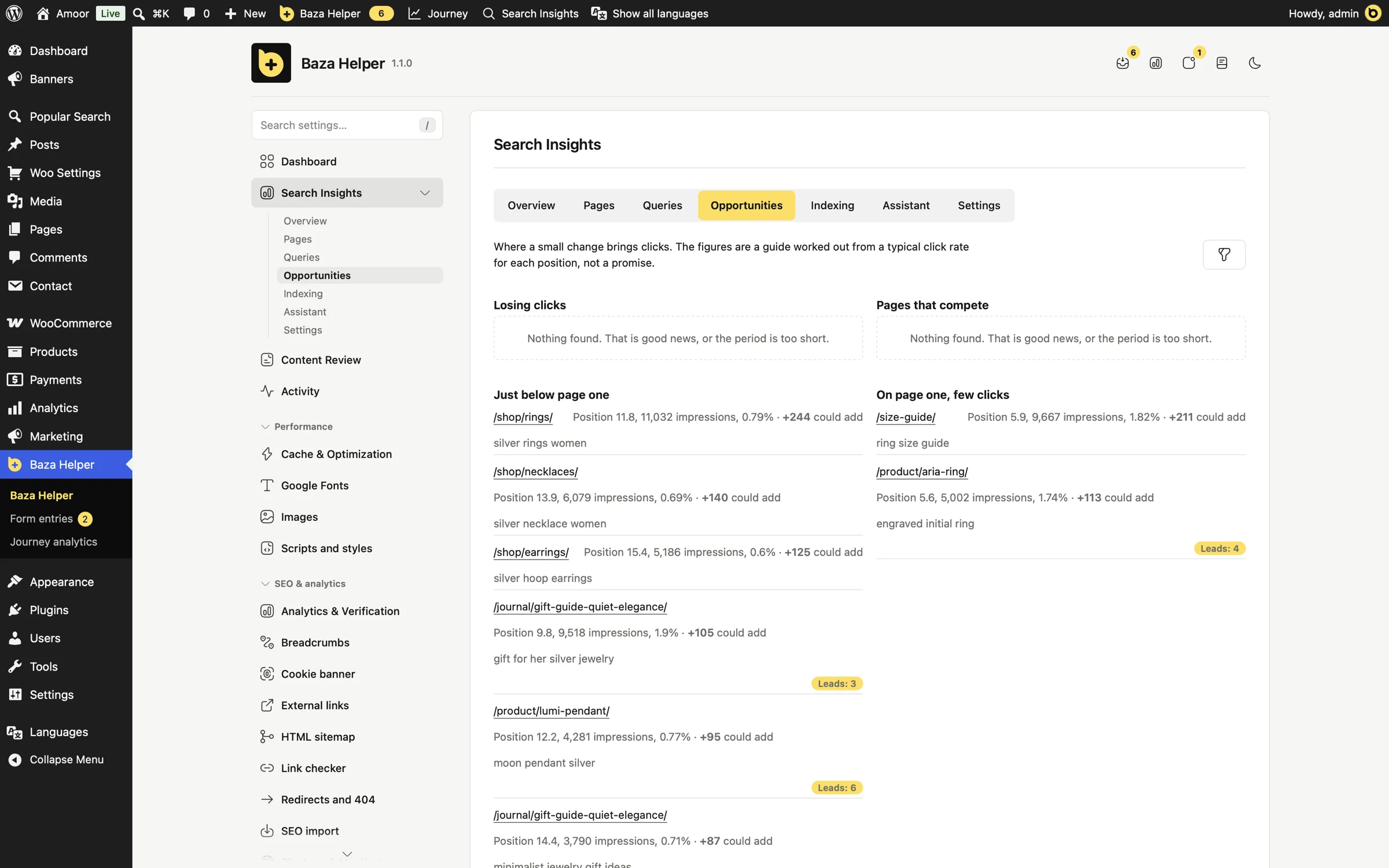
See where a small change brings clicks
Pages just below page one and pages on page one with few clicks, with a guide to the clicks you could add. The guide comes from a typical click rate for each position; it is not a promise.
- 10 / 10
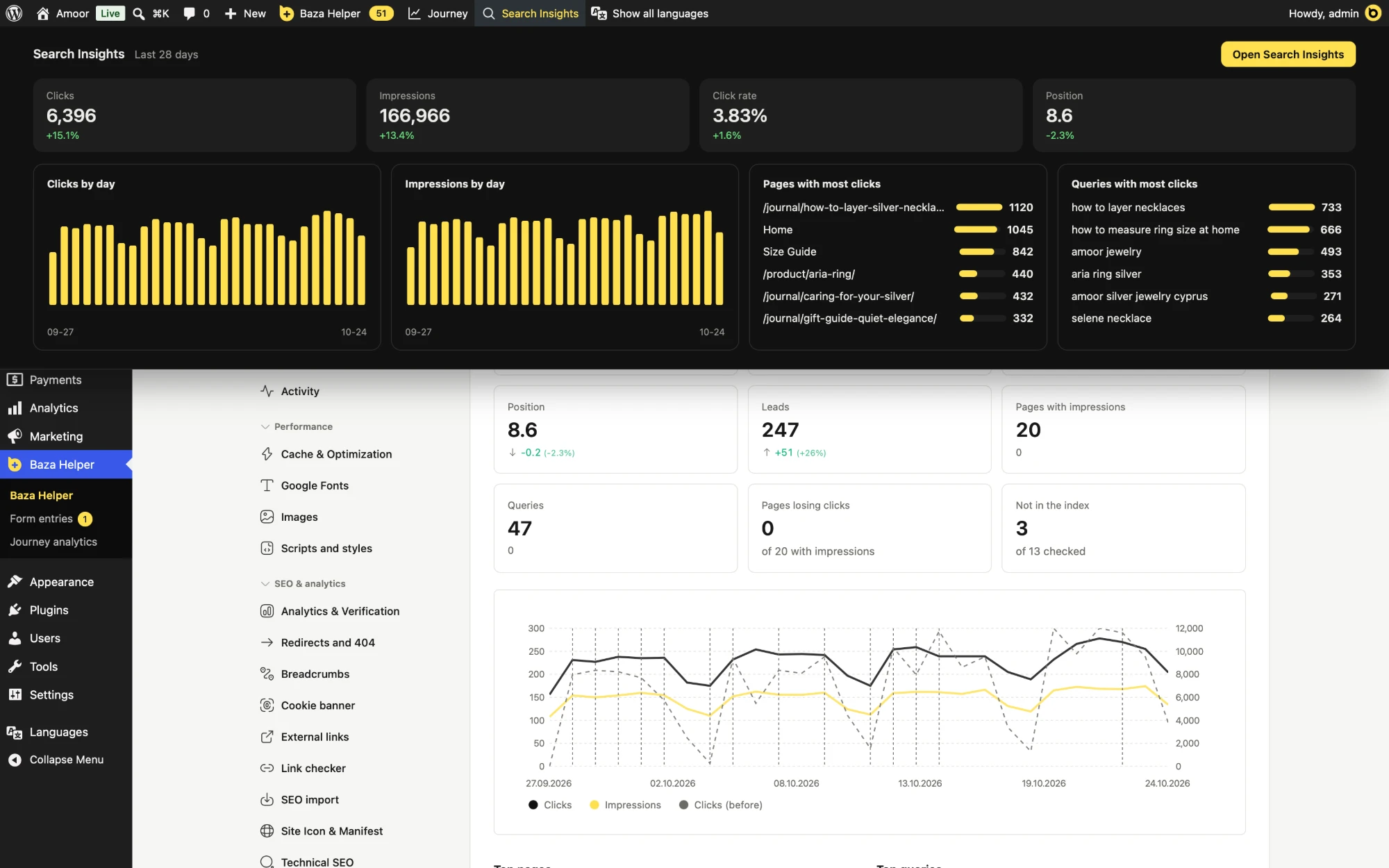
Search numbers one hover away
From any page, the admin bar opens a band with clicks, impressions, click rate and position, the daily curves and the top pages and queries.
Your data, on your own site
The data comes from Google only, and no third party sees it. Nothing is sent to Baza Developers.
What it does
- Reads Search Console with read-only access
- Keeps a copy in your own database
- Stores the Google key encrypted, in a file outside the web root, or in wp-config.php
- Gives your assistant its own revocable key that can only read search data
What it does not do
- It never changes anything in Search Console
- It sends nothing to Baza Developers or to a third-party service
- It does not edit your pages: a fix is a proposal until you press Apply
- It needs no connector service and no monthly fee besides Baza Helper Pro
Rare queries are anonymised by Google and are missing from the data, as in Search Console itself.
The same data, without the spreadsheet
| Without Search Insights | With Search Insights |
|---|---|
| You export tables from Search Console by hand | The data is copied to your site every day |
| You paste tables into a chat every week | The assistant asks for the answers itself, read-only |
| Google keeps about 16 months | You keep your own history, from 30 to 485 days |
| A connector needs an account and a fee, and holds your data | Your site holds the data, with no one in between |
| A fix is typed into the page by hand | The fix arrives as a Content Review proposal that you approve |
Made for people who live on search traffic
An SEO specialist
Finds the pages that lose clicks and the queries that compete with each other, without exporting a single table.
An owner or an editor with an AI assistant
Asks in plain words what to improve first, and gets a proposal to approve instead of a long report.
An agency that runs sites for clients
Each client site keeps its own search history, in its own database, and nothing is shared with a third party.
What it needs, and what it is not
The Pro package
Search Insights is in the Pro, Plus and Agency plans. Nothing changes on your pages until you press "Apply".
Read access in Search Console
A service account key (recommended) or your own Google OAuth client, with read access to your property.
An assistant, if you want answers in a chat
Any assistant that runs commands or sends web requests. The dashboard works without one.
What it is not
- It cannot get what Google no longer has: Search Console keeps about 16 months and its data is 2 to 3 days late.
- Google returns a limited number of rows per day for a property, and the plugin stores what Google returns.
- It reads Search Console only: it is not a rank tracker and it never changes anything in Search Console.
- It is not an assistant: it does not write text. Your assistant reads the answers and proposes the fix.
Questions before you start
Does it change anything in Search Console?
No. It reads data with read-only access and never changes anything there.
Where is my data stored?
In a table of your own WordPress database. Nothing is sent to Baza Developers or to a third party.
How far back does the data go?
The first connection fills as many days back as you choose, from 7 to 485, and the plugin keeps adding every day. You choose how long to keep it, from 30 to 485 days. It cannot get what Google no longer has.
Which assistant can I use?
Any assistant that runs commands or sends web requests, such as Claude, ChatGPT, Gemini or Cursor. For MCP the client must be able to send an Authorization header. Web connectors that insist on OAuth are not supported yet.
Can the assistant edit my pages?
Its key only reads search data. A fix comes as a Content Review proposal, and a page changes only after you press Apply.
What is IndexNow?
A way to tell Bing and other search engines that support IndexNow that a page was added, changed or removed. The plugin can do it with a button, from a list, or automatically.
How do I connect Google?
With a service account key added to Search Console as a user with read access (recommended), or with your own Google OAuth client and a "Connect with Google" button.
Is it in the free version?
No. Search Insights is a Pro tool, included in the Pro, Plus and Agency plans.
Ask your search data in plain words
Search Insights is a Pro tool, included in the Pro, Plus and Agency plans.
