Zapier Integration
This page documents the API and webhook structure used by the Baza Booking Calendar Zapier integration. It covers authentication, available events, and the exact payload fields sent with each event.
Authentication
Access is tied to your Baza Booking Calendar license key. The same key is used both to verify your plan and to authenticate requests to the subscription endpoints below. The Zapier integration requires a license on the Pro or Elite plan with Zapier sync enabled.
Native subscription endpoints (REST Hook)
For a native Zap trigger experience, Baza Booking Calendar exposes subscribe and unsubscribe endpoints, so a Zap can turn on and off automatically without manually copying a webhook URL.
| Method | Endpoint | Purpose |
|---|---|---|
POST | /wp-json/bbc/v1/zapier/subscribe | Registers a subscription when a Zap is turned on |
DELETE | /wp-json/bbc/v1/zapier/unsubscribe/{id} | Removes a subscription when a Zap is turned off |
GET | /wp-json/bbc/v1/zapier/subscriptions | Debug endpoint, lists active subscriptions |
All three endpoints require the license key as a bearer token:
Authorization: Bearer YOUR_LICENSE_KEYSubscribe requests accept a JSON body specifying where to send events and, optionally, which event to filter on. An empty event value subscribes to all events.
POST /wp-json/bbc/v1/zapier/subscribe
{
  "target_url": "https://hooks.zapier.com/hooks/standard/...",
  "event": "booking.confirmed"
}
The response includes a subscription id, used to unsubscribe later:
{ "id": "sub_123" }Active subscriptions are stored in the bbc_zapier_subscriptions WordPress option. The legacy single-URL webhook setting (bbc_zapier_url in the plugin’s admin settings) continues to work in parallel, so existing manual Zapier setups are not affected by this addition.
Webhook setup
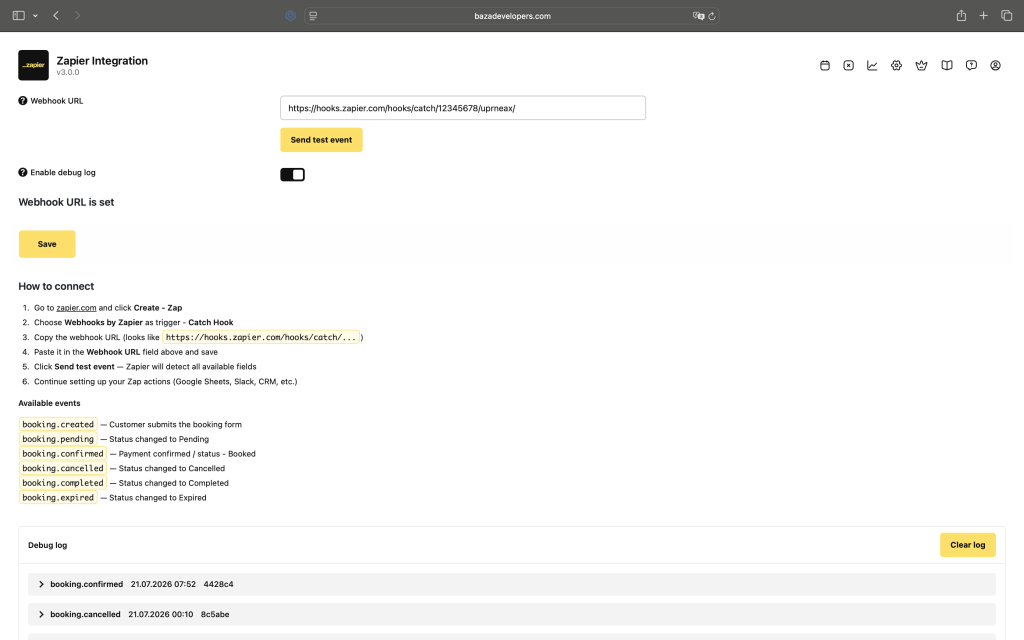
Baza Booking Calendar pushes booking events to a webhook URL configured in the plugin’s admin settings, under Baza Booking, Settings, Zapier. The webhook fires automatically whenever a booking is created or its status changes.
Available events
| Event | Fires when |
|---|---|
booking.created | Customer submits the booking form |
booking.pending | Status changes to Pending |
booking.confirmed | Payment confirmed / status changes to Booked |
booking.cancelled | Status changes to Cancelled |
booking.completed | Status changes to Completed |
booking.expired | Status changes to Expired |
google_calendar.disconnected | Google Calendar connection is disconnected |
Payload structure
Single-service booking payload:
{
  "event": "booking.confirmed",
  "site_url": "https://example.com",
  "timestamp": "2026-08-12T14:00:00+02:00",
  "booking_id": 1234,
  "order_id": "ABC-001",
  "order_status": "booked",
  "order_status_label": "Booked",
  "service": "Studio / Room A",
  "booking_dates": "12.08.2026\n10:00 - 12:00",
  "booking_dates_raw": "2026/08/12/10:00-12:00",
  "booking_price": "150",
  "tax_rate": 20,
  "tax_amount": 25,
  "payment_made": "75",
  "remaining_payment": "75",
  "customer": {
    "name": "Ivan Ivanov",
    "phone": "+380991234567",
    "email": "ivan@example.com"
  },
  "admin_url": "https://example.com/wp-admin/admin.php?page=bbc-bookings&edit=1234",
  "zoom_url": "https://zoom.us/j/123456789",
  "google_meet_url": "https://meet.google.com/abc-defg-hij",
  "custom_fields": {
    "my_custom_field": "value"
  }
}
Cart-mode booking payload, when multiple services are booked in one order, service and booking_dates are replaced by a cart_items array:
{
  "event": "booking.confirmed",
  "site_url": "https://example.com",
  "timestamp": "2026-08-12T14:00:00+02:00",
  "booking_id": 1234,
  "order_id": "ABC-001",
  "order_status": "booked",
  "order_status_label": "Booked",
  "cart_items": [
    {
      "service": "Studio / Room A",
      "booking_dates": "12.08.2026\n10:00 - 11:00",
      "booking_dates_raw": "2026/08/12/10:00-11:00",
      "price": "75.00"
    },
    {
      "service": "Studio / Room B",
      "booking_dates": "12.08.2026\n11:00 - 12:00",
      "booking_dates_raw": "2026/08/12/11:00-12:00",
      "price": "75.00"
    }
  ],
  "booking_price": "150",
  "tax_rate": 20,
  "tax_amount": 25,
  "payment_made": "75",
  "remaining_payment": "75"
}
Field reference
| Field | Type | Description |
|---|---|---|
event | string | Event name, see events table above |
site_url | string | URL of the site the booking was made on |
timestamp | string | ISO 8601 timestamp of the event |
booking_id | integer | Internal booking ID |
order_id | string | Order reference ID |
order_status | string | Machine-readable status |
order_status_label | string | Human-readable status label |
service | string | Service name (single-service bookings only) |
booking_dates | string | Formatted booking date and time (single-service bookings only) |
booking_dates_raw | string | Machine-readable date/time range |
cart_items | array | List of booked services (cart-mode bookings only), each with service, booking_dates, booking_dates_raw, price |
booking_price | string | Total order price |
tax_rate | number | Tax rate percentage |
tax_amount | number | Tax amount |
payment_made | string | Amount paid so far |
remaining_payment | string | Remaining balance due |
customer.name | string | Customer name |
customer.phone | string | Customer phone number |
customer.email | string | Customer email |
admin_url | string | Direct link to the booking in the WordPress admin |
zoom_url | string | Zoom meeting link, if Zoom integration is enabled for the service |
google_meet_url | string | Google Meet link, if generated via Google Calendar sync |
custom_fields | object | Any custom form fields configured for the booking form |
All fields are mappable to any target application field in Zapier, no code required.
Manual setup (Webhooks by Zapier)
Until the native Baza Booking Calendar app is available in the Zapier App Directory, the integration can be set up manually using Zapier’s built-in Webhooks trigger:
- Go to zapier.com and click Create, Zap
- Choose Webhooks by Zapier as trigger, Catch Hook
- Copy the webhook URL (looks like
https://hooks.zapier.com/hooks/catch/...) - Paste it in the Webhook URL field in Baza Booking, Settings, Zapier, and save
- Click Send test event, Zapier will detect all available fields
- Continue setting up your Zap actions (Google Sheets, Slack, CRM, etc.)
Plan requirements
The Zapier integration is available on the Pro and Elite plans of Baza Booking Calendar. It is not available on the free trial or without a valid Pro/Elite license key.
