WordPress antivirus that checks every file for malware
Baza Helper Pro scans your files and database for malware, compares WordPress and plugins with their official files and watches code changes while the site runs. A suspicious file goes to quarantine and comes back in one click.
- 47,950 known vulnerabilities in our database
- 5minutes between checks of changed files
- 24hours between updates of the rules and the list of vulnerabilities
- 0 of your files leave the site
- Malware scanner
- Quick and full scan
- Official files check
- Known vulnerabilities
- Quarantine and restore
- Upload check
A hacked site is noticed late
Malware hides in plain sight
A backdoor in a plugin file or a script inside an upload does not change how the site looks, so it can stay unnoticed for a long time.
You cannot tell which file changed
Without the official copy to compare with, a changed WordPress or plugin file looks like any other, and cleaning by hand is guesswork.
One check is not enough
A scan you run once misses the file that arrives tomorrow. New code has to be noticed within minutes, not at the next clean-up.
A scan that checks every file
The antivirus of Baza Helper Pro goes through the files and the database, compares WordPress and plugins with their official files and watches code changes while the site runs. It is not a firewall, and results come in minutes, not instantly.
- Quick and full scans of code, files, posts and options
- WordPress and plugins compared with their official files
- Suspicious files quarantined and restored in one click
- Uploads checked, code watched every five minutes
47,950known vulnerabilities in our databaseUpdated 22.11.2026
Every finding, quarantine and log in one tab
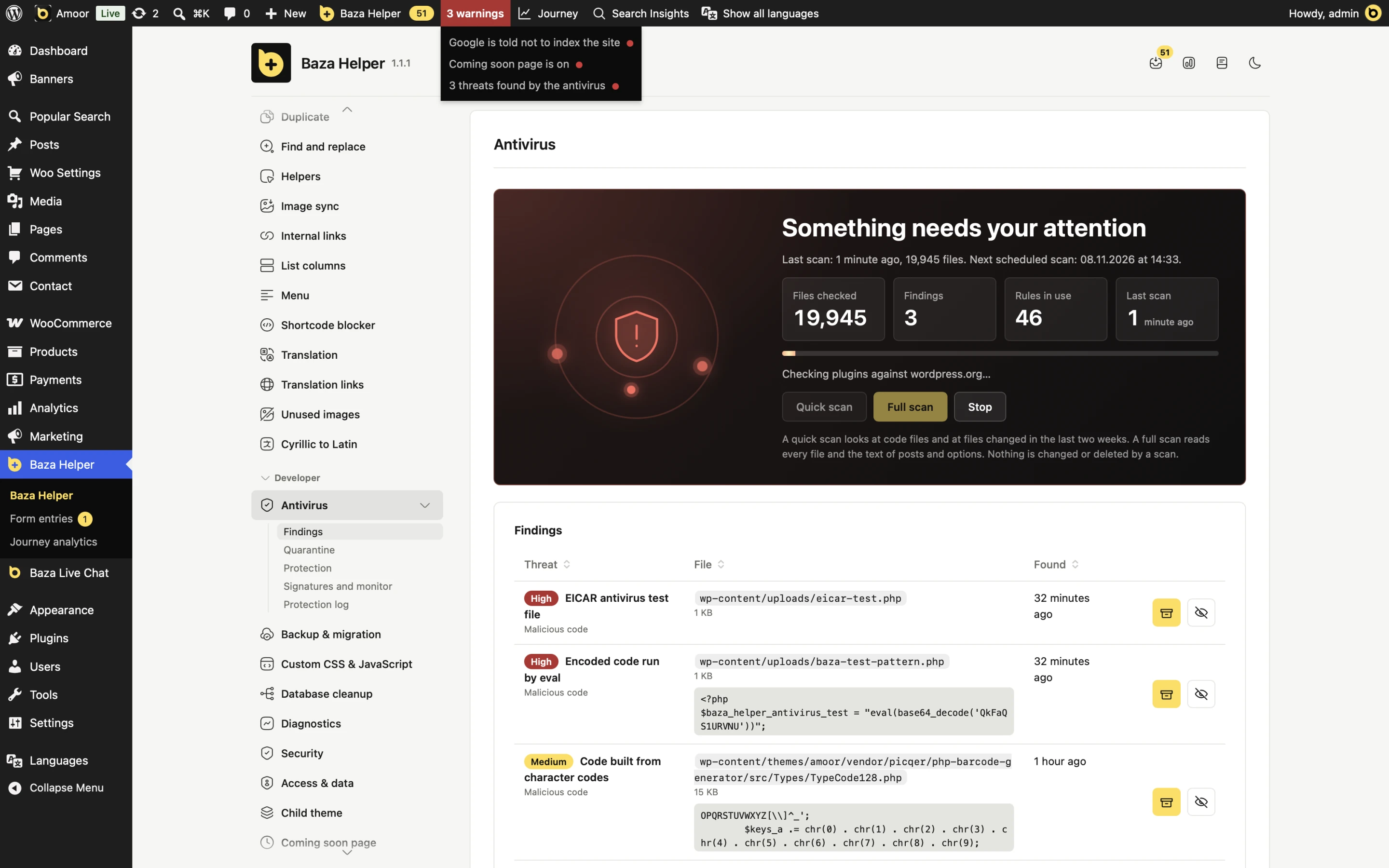
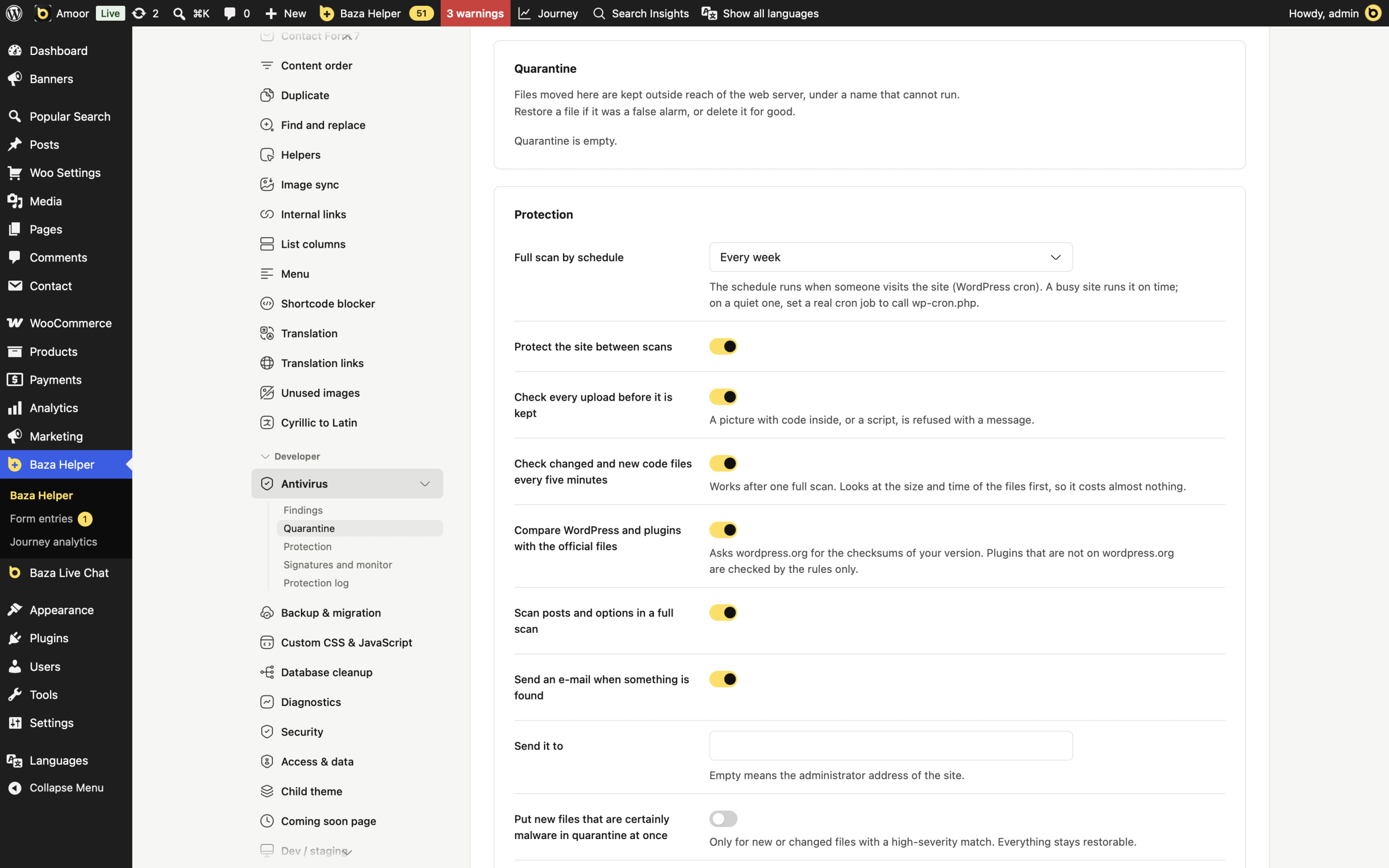
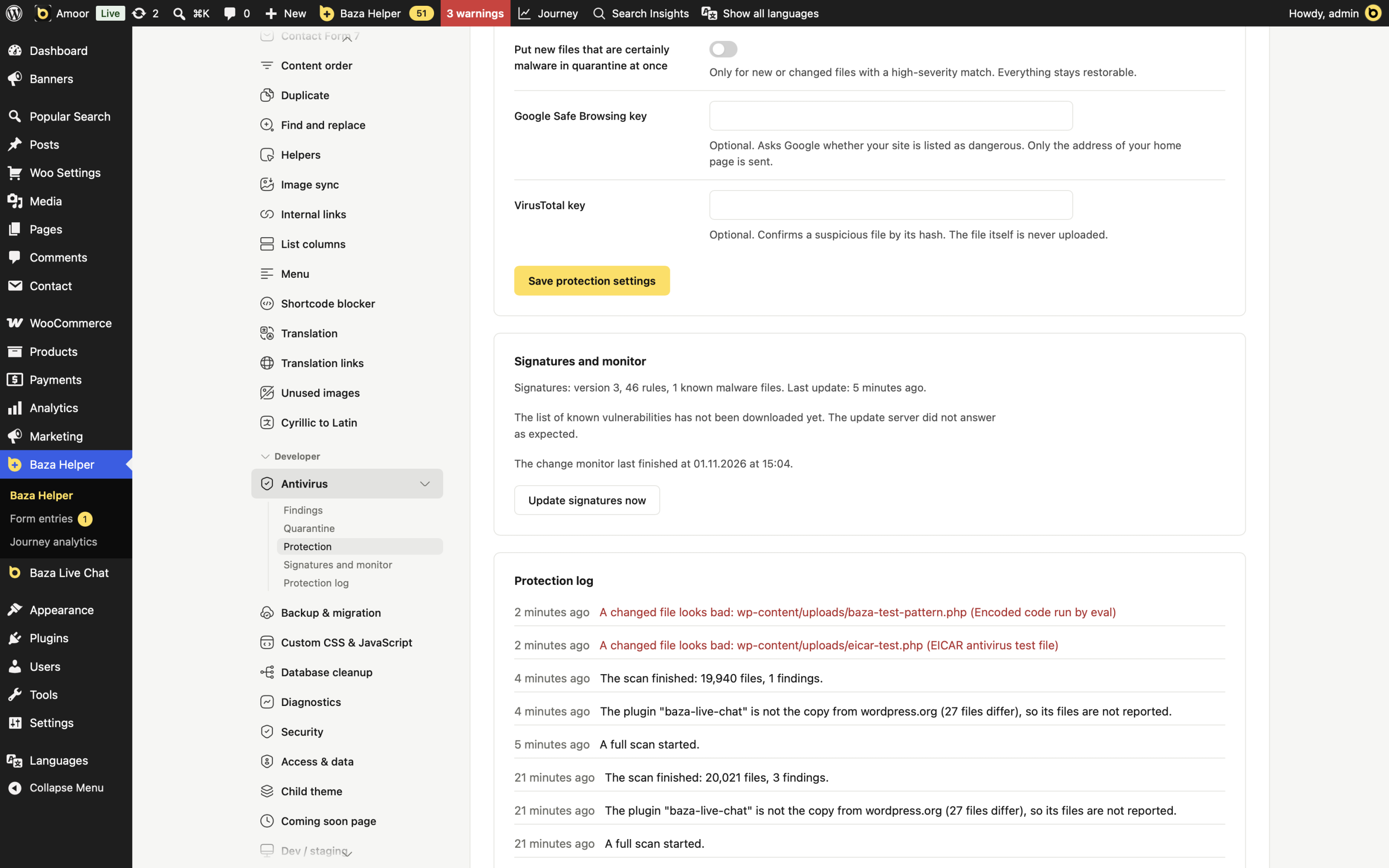
Screens of the Antivirus tab in Baza Helper, taken on a test site with test files.
- 01 / 03
Watch the scan and read what it finds
While a scan runs, the card shows a progress bar with the step it is on and a Stop button. The table below lists each threat with its severity, file and time, with buttons to quarantine or ignore it.
- 02 / 03
Quarantine and protection between scans
Quarantined files wait outside the reach of the web server and come back with Restore. The switches turn on the schedule, the upload check, the five-minute check and the e-mail alert.
- 03 / 03
Signatures, monitor and protection log
Optional Google Safe Browsing and VirusTotal keys, the version of the rules with an Update signatures now button, and a log of what the scan and the monitor found.
Your files stay on your site
The scan runs on your own server. Nothing about your files is sent with a rules update.
What it does
- Scans files and the database in short steps, so it works on a small host
- Checks uploads before they are kept and refuses a picture with code inside
- Checks changed and new code files every five minutes after the first full scan
- Sends an e-mail when something is found or an administrator is added, at most one of each kind an hour
What it does not do
- It never uploads your files: VirusTotal, if you add your key, gets only the hash of a suspicious file
- It never touches wp-config.php, the root index.php, .htaccess, symbolic links or files outside your WordPress folder
- It does not change or delete anything during a scan
Once a day the site downloads updates of the rules and of the list of known vulnerabilities from our server.
Scan, review and restore in four steps
Scan the site
Run a quick scan of code and recent files, a full scan of every file and the database, or let a schedule do it every day or week.
Compare with the official files
WordPress and plugins from wordpress.org are compared with their official files, and the versions you run are checked against a list of known vulnerabilities.
Review the findings
Each finding shows the file, the rule that matched and its severity. Read the code around the match and decide: restore, quarantine or ignore.
Restore what changed
Quarantine moves a file out of reach and can bring it back. For a core or plugin file one click puts the official file back. Nothing is deleted unless you choose Delete.
What the scanner looks for
Malicious code in files
Backdoors, web shells and obfuscated scripts in themes, plugins and uploads, found by rules that the site downloads from our server once a day.
Changed core and plugin files
A WordPress or wordpress.org plugin file that differs from its official release, with the checksum checked before it is replaced.
Unknown PHP where it does not belong
A PHP file inside wp-admin or wp-includes that is not part of WordPress, and a script or code hidden in an uploaded picture.
Bad code in posts and options
A full scan also reads the text of posts and options, where injected scripts and spam links often hide.
Known vulnerabilities
Plugins, themes and WordPress versions with a publicly known vulnerability, so you know what to update first.
A listed home page
With your own Google Safe Browsing key, a check whether the address of your home page is listed as dangerous. Only that address is sent.
Real scans, step by step
What it needs, and what it is not
Baza Helper Pro
The Antivirus feature is part of your Baza Helper Pro plan. Administrator access to the site is enough to use it.
A backup
Make a backup before you restore or delete anything, as with any change to the files of a site.
A little patience
A new or changed file is noticed within minutes, not at once.
What it is not
- It is not a firewall: it does not block requests, it finds and helps you clean what is already on the site.
- It does not promise that a site can never be infected, and a scan reports what its rules and the official files can show.
- A plugin from wordpress.org that differs from its release is marked low severity: the owner may have changed it, so check before you act.
- A plugin that is not on wordpress.org has no official file to compare with and is checked by the rules only.
Questions about WordPress malware scans
How do I scan a WordPress site for malware?
Open Baza Helper, then Antivirus, and press Quick scan for code and recent files or Full scan for every file and the database. A scan does not change or delete anything by itself.
Is it a firewall?
No. It does not block requests. It finds malware and changed files, and a new file is noticed within minutes.
How does the comparison with official files work?
WordPress core and plugins from wordpress.org are compared with their official releases. For such a file, Restore the official file downloads the official version, checks it against the official checksum and keeps your changed file in quarantine.
Can it remove malware by itself?
It never deletes anything on its own. You review each finding, then quarantine it, restore the official file or ignore it. Quarantine can be undone with Restore.
What if my site is already infected?
Run a full scan, quarantine the files you are sure of, change all administrator, hosting and FTP passwords, restore official files, clean the posts and options found, and scan again until nothing new appears. We can do it with you.
Does it check plugins and themes for vulnerabilities?
Yes. The versions you run are checked against a list of known vulnerabilities, so you see what to update first.
Are my files sent anywhere?
No. The scan runs on your server. Google Safe Browsing and VirusTotal are optional and use your own keys: Safe Browsing gets only your home page address and VirusTotal only the hash of a suspicious file.
Can it scan on a schedule?
Yes. Turn on Full scan by schedule to run a full check every day or week. On a quiet site, set a real cron job to call wp-cron.php.
Is the antivirus in the free version?
No. The free Baza Helper is on wordpress.org; the Antivirus is a Pro feature.
Know what is on your site
The Antivirus is part of Baza Helper Pro. The free Baza Helper is on wordpress.org.
