Menu studio: build a menu with drag and drop
The Menu studio (Baza Helper > Menu studio) is a visual editor for site menus. It works with any theme. Baza Theme prints the menu with its own header markup, and every other theme can print it with a shortcode, a PHP call or a block.
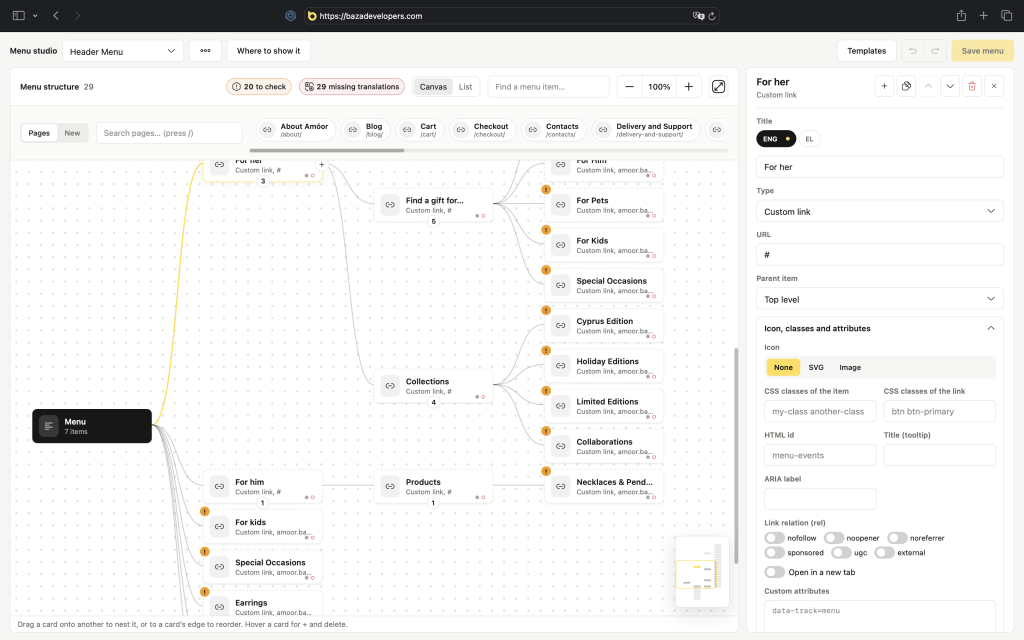
Build a menu
- Add items and drag them on the canvas. Drop an item onto another card to nest it, or reorder by dropping at an edge.
- Select several items at once, zoom the canvas and use the minimap.
- Use undo and redo and start from templates.
- Press Full screen to get a bigger canvas. Esc or the same button leaves it.
The item panel
Select an item to edit it. The actions are icon buttons: add child, duplicate, up, down and remove. Fields run two per row.
- Titles per language: up to three languages are chips on the label row, more turn the label into a switcher. Canvas cards show dots for filled languages.
- Icon, classes and attributes (accordion): icon (none, a pasted SVG with live preview, or an image from the library), its position, CSS classes of the item and the link, HTML id, title, ARIA label, rel tokens, new tab, and custom
data-*andaria-*attributes. - Fields are checked as you type: CSS identifiers, a unique id and the allowed attributes. An invalid value is explained and not saved. An SVG the sanitizer cannot rebuild is refused with a reason.
The editor also warns about broken links and missing translations. The toolbar chips show the numbers.
Mega panels
An item can open a mega panel with 1 to 4 columns. A panel is made of blocks: text, image, link group and halls (services of the booking calendar, when it is installed).
Several menus and places
- Use the bar above the canvas to switch menus, New menu, Rename and Delete. The main menu always exists and cannot be deleted. There can be 30 menus.
- Where to show it lists the theme’s menu places as checkboxes. A ticked place prints this menu where the theme asks for that place.
- Import a WordPress menu turns a menu made in Appearance > Menus into a studio menu. The WordPress menu stays untouched. When the open studio menu is empty and the site has a WordPress menu, the import panel appears by itself.
Show the menu on the site
[baza_menu id="main" class="my-nav" label="Main menu"]
 'main', 'class' => 'my-nav', 'label' => 'Main menu' ) ); ?>
Without an id the main menu is used. The output is a nav with nested lists, real buttons for mega panels, a hamburger on small screens and keyboard support (Esc, ArrowDown). For block themes there is the Baza menu block (baza-helper/menu) in Appearance > Editor, with the menu picked in the sidebar. The CSS and JavaScript load only on pages that print a menu. Colours and sizes are CSS variables that start with --baza-menu-.
Languages
Languages come from WPML, Polylang or TranslatePress, and otherwise from the site’s own language setting and the language cookie.
Saving
Save with the page bar or Ctrl+S. Saving needs the edit_theme_options capability. The menu is cleaned on save: unknown item types are dropped and only safe classes and attributes remain.
