Loyalty Programs
How the Loyalty Discount Works
Customers don’t need to log in to get a loyalty discount. The system identifies them automatically by their email address or phone number when they place a booking. If the person is already in the system, the new order gets added to their account. If not, a record is created automatically as long as an email address was provided.
Setup
First, go to General Settings and turn on the option “Register users when submitting a booking.” This links new bookings to user accounts automatically.
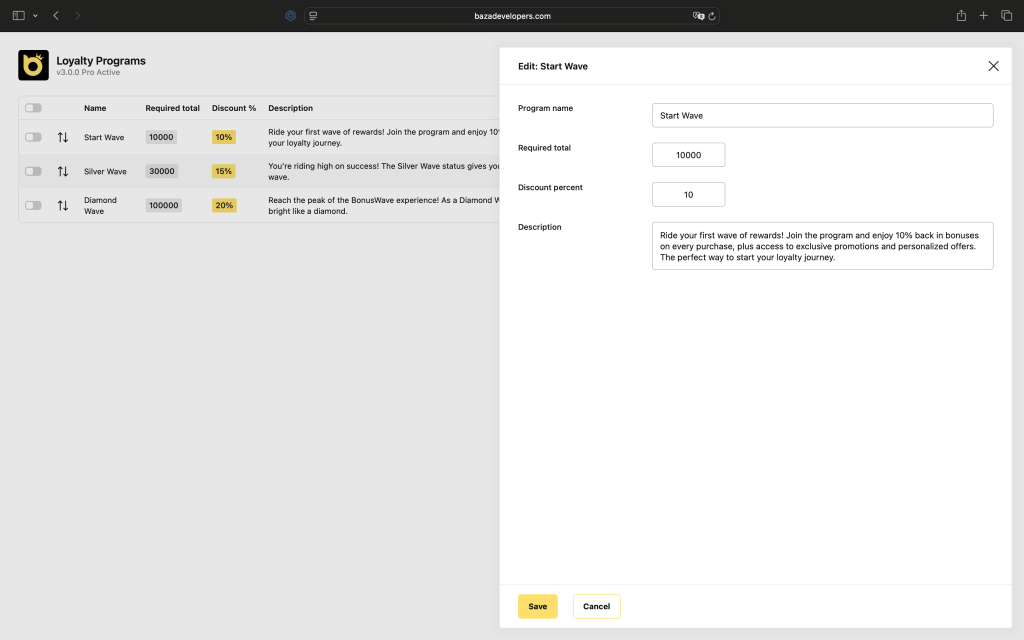
Then open Baza Booking, go to Loyalty Programs, and create your loyalty levels. Each level needs a name, a minimum total booking amount that the customer has to reach, and a discount percentage. A description is optional. Keep in mind that you can’t save two levels with identical settings – the system will warn you if you try.
Authentication Module
When you activate loyalty programs, the authentication module gets enabled as well. This gives customers access to their personal account and shows login and registration links on your site.
