Discord
The Discord integration sends website chat messages to a Discord channel. It is receive-only: typing a reply in Discord does not send it to the website visitor. Configure another operator channel, such as Telegram, Slack or Microsoft Teams, if your team needs to answer.
Create a Discord webhook
- Open the settings of the Discord channel that should receive chat messages.
- Go to Integrations > Webhooks > New Webhook.
- Copy the Webhook URL.
Save it in WordPress
- Open Baza Live Chat > Settings > Channels.
- Choose Discord in Messenger and paste the address into Webhook URL.
- Click Save before using Send a test message.
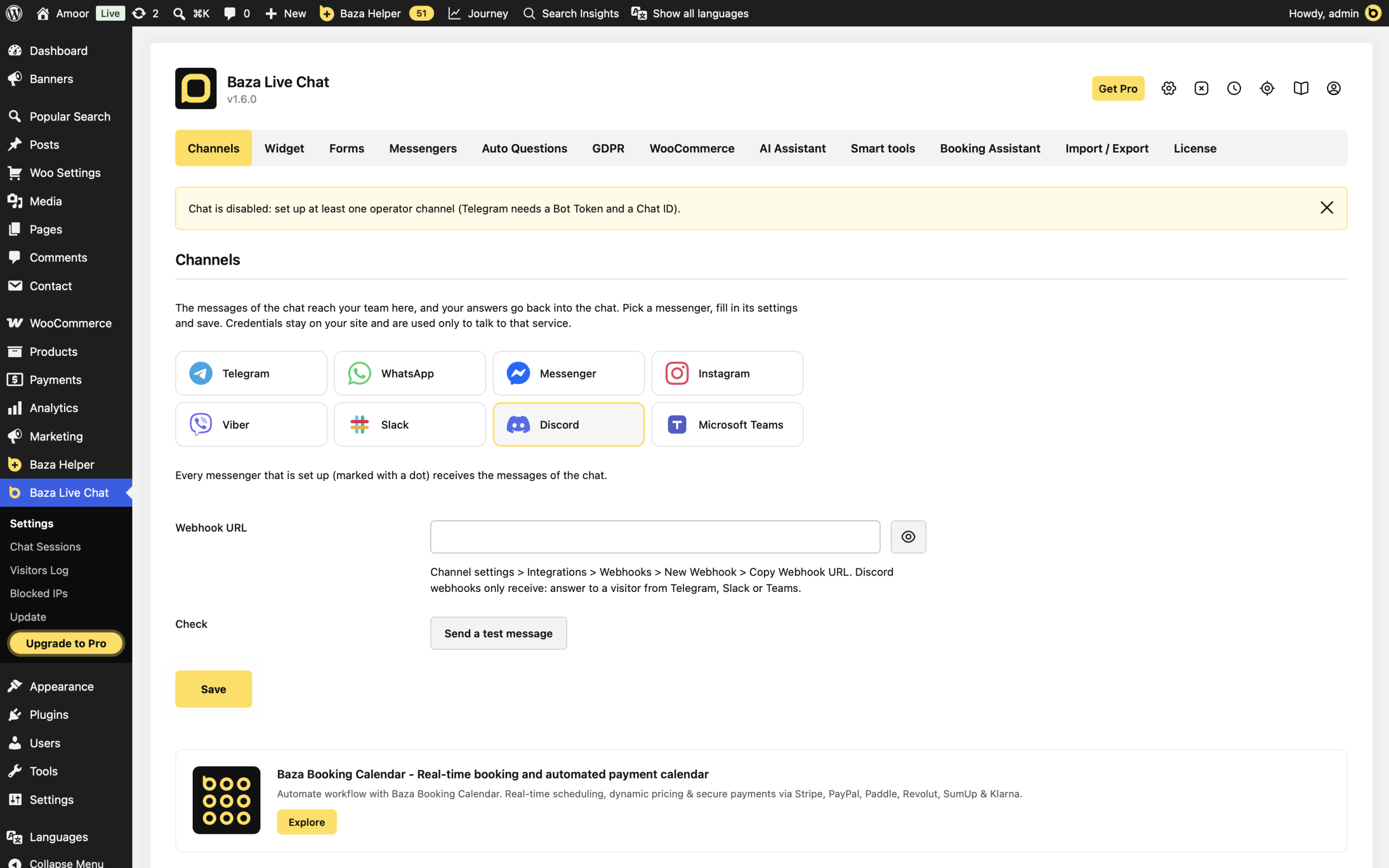
Check delivery
Click Send a test message and confirm that it appears in Discord. Then send a message from the website chat and check the channel again. Other configured channels continue to receive messages too.
If it does not work
- Nothing arrives: check that the webhook was saved and belongs to the intended Discord channel. Read the test result and the latest chat error in settings.
- The webhook is rejected: use the complete webhook URL copied from Discord, not a server invitation or channel link.
- You cannot reply: this is expected. Discord webhooks in this integration only receive. Use another configured operator channel to answer the visitor.
A public Discord invitation belongs in the separate Messengers tab. It opens Discord for the visitor and does not configure operator notifications.
Last Modified: 30.10.2026
