Slack
Slack lets your team receive website chats and answer visitors from the matching thread. These instructions cover Baza Live Chat 1.4.0. You need a Slack app and access to its settings.
Prepare your Slack app
- Create a Slack app for your workspace. In its bot permissions, add chat:write and channels:history.
- Install the app in the workspace and copy its bot token, which starts with xoxb-.
- Invite the bot to the channel where your team will receive chats. Open that channel’s details and copy the Channel ID at the bottom. Use the ID, not the channel name.
- In the app’s Basic Information, copy the Signing secret.
Connect the channel
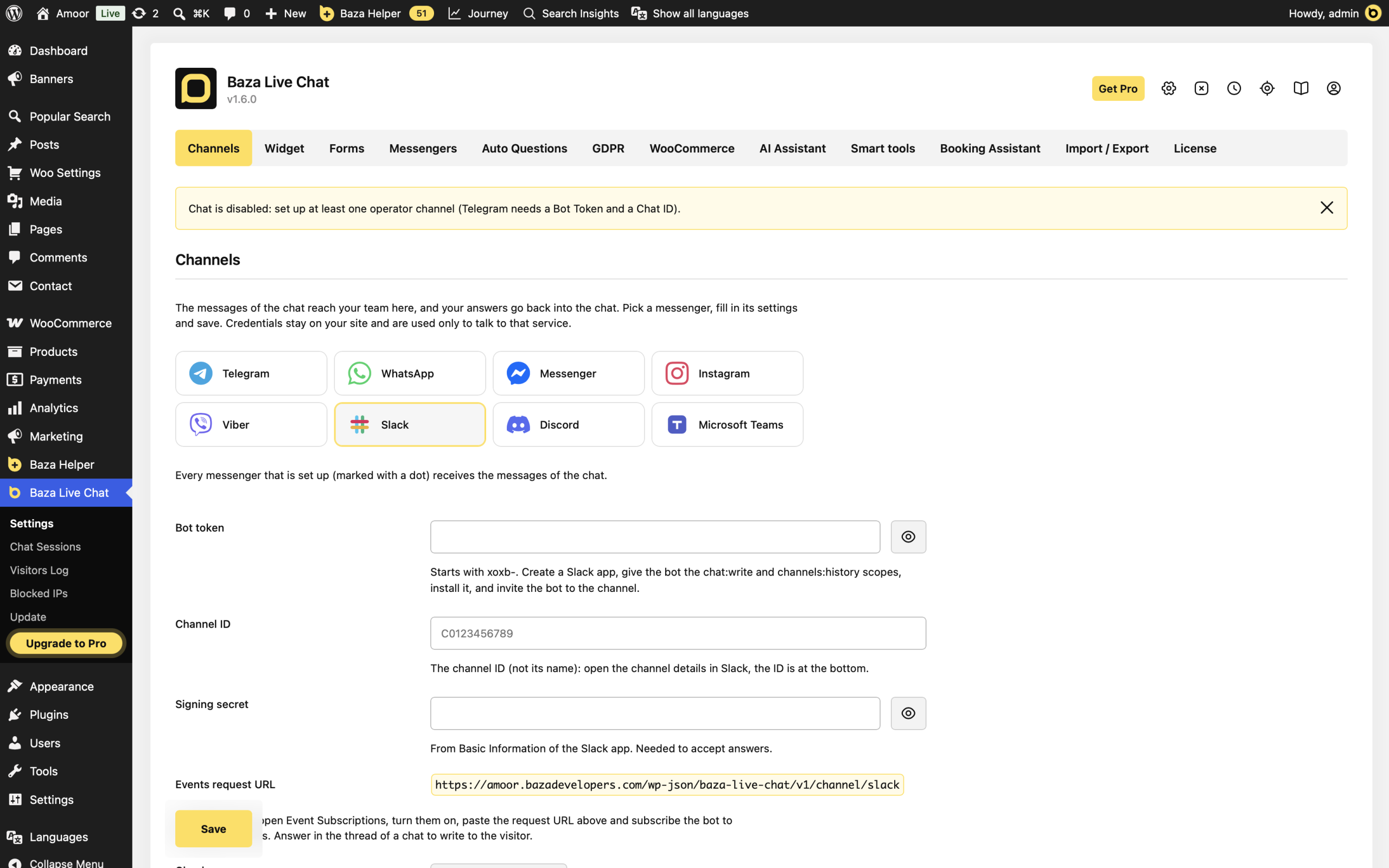
- In WordPress, open Baza Live Chat > Settings > Channels. Choose Slack in Messenger.
- Enter Bot token, Channel ID and Signing secret, then click Save.
- Copy Events request URL from your own settings. The screenshot uses a local demonstration site; do not copy its address.
- In your Slack app, open Event Subscriptions, enable events and paste that URL. Subscribe to the bot event message.channels.
Test messages and replies
- After saving, click Send a test message. Check that it appears in the selected Slack channel.
- Open your website as a visitor and send a chat message.
- Open the thread created for that conversation in Slack and reply inside it. Check the website chat for your answer.
All configured operator channels receive chat messages. Selecting another messenger in Channels does not turn Slack off.
If it does not work
- No test message: check the saved token, bot permissions, Channel ID and whether the bot has joined that channel. Read the error returned by the test and the latest chat error in settings.
- Messages arrive but replies do not: check Signing secret, the Events request URL and the message.channels subscription.
- A reply cannot be matched: reply inside the thread created for that chat. A new top-level channel message is not a visitor reply.
- Signature rejected: use the signing secret from the same Slack app, and check the server clock. The plugin also checks the request timestamp.
Last Modified: 30.10.2026
